

A plain-English guide to running AI on your own computer versus paying for ChatGPT, Claude, or Gemini. What each budget actually buys, the real breakeven math, and why owning shrinks your bill instead of replacing it.
Every month I pay rent on AI. Subscriptions, API keys, the whole stack, somewhere around $250 to $300. I have published that receipt before in the Budget Builder's Playbook, so no hiding it. That is $3,000 to $3,600 a year to rent access to smart machines I do not own.
Then there was this line from my journal in the spring: "Ran into Claude limits for the week. Can't use until 4/23 unless I upgrade." That entry is the whole reason this article exists. When you rent, someone else decides when you are done for the week.
So this month I finally did the homework I had been avoiding: at what point does it make sense to buy a computer that runs AI at home and stop paying rent?
I will tell you up front where I landed, because I promised no hype. For most people, the honest answer is keep renting. But there is a real line where that flips, and I am going to show you exactly where it is. I learned some of this the messy way, so you do not have to.
Quick answer
Should you buy a computer to run AI at home?
Most beginners should keep renting AI through ChatGPT, Claude, or Gemini. The quality is better and there is nothing to maintain. Buying a computer to run AI at home starts making sense when one of three things is true: you are hitting rate limits and stacking multiple subscriptions, you are running the same simple AI task thousands of times, or you are working with private data you cannot hand to a big company. This guide walks the options from $0 to $8,000 and up, and the first move costs nothing. The honest bottom line: a home machine does not replace ChatGPT-level thinking. It shrinks your bill for the routine work.
New to terms like model, memory, or tokens? Keep the ACC glossary open while you read. And I am collecting real numbers for a follow-up, so reply to the newsletter and tell me your monthly AI bill. No judgment, I am the guy paying $300.
Quick Start
What to do first
Try free before you spend a dollar. One evening with the computer you already have answers most of this question. Install LM Studio or Ollama and run a small model tonight.
Never buy for "it fits." Buy for "it fits and talks at reading speed." Room without speed is a demo, not a tool.
Buy by rung, not by price tag. Prices are shortage-crazy right now and change monthly. The rungs outlive the numbers.
Your home box does the boring reps; your subscription does the thinking. Route the cheap, repetitive work to the machine you own and keep renting the smartest models for the hard problems. Both, not either.
If you can't name the weekly task, you're buying a toy. Name the job the machine will do before you shop. No named task, no purchase.
Renting vs Owning
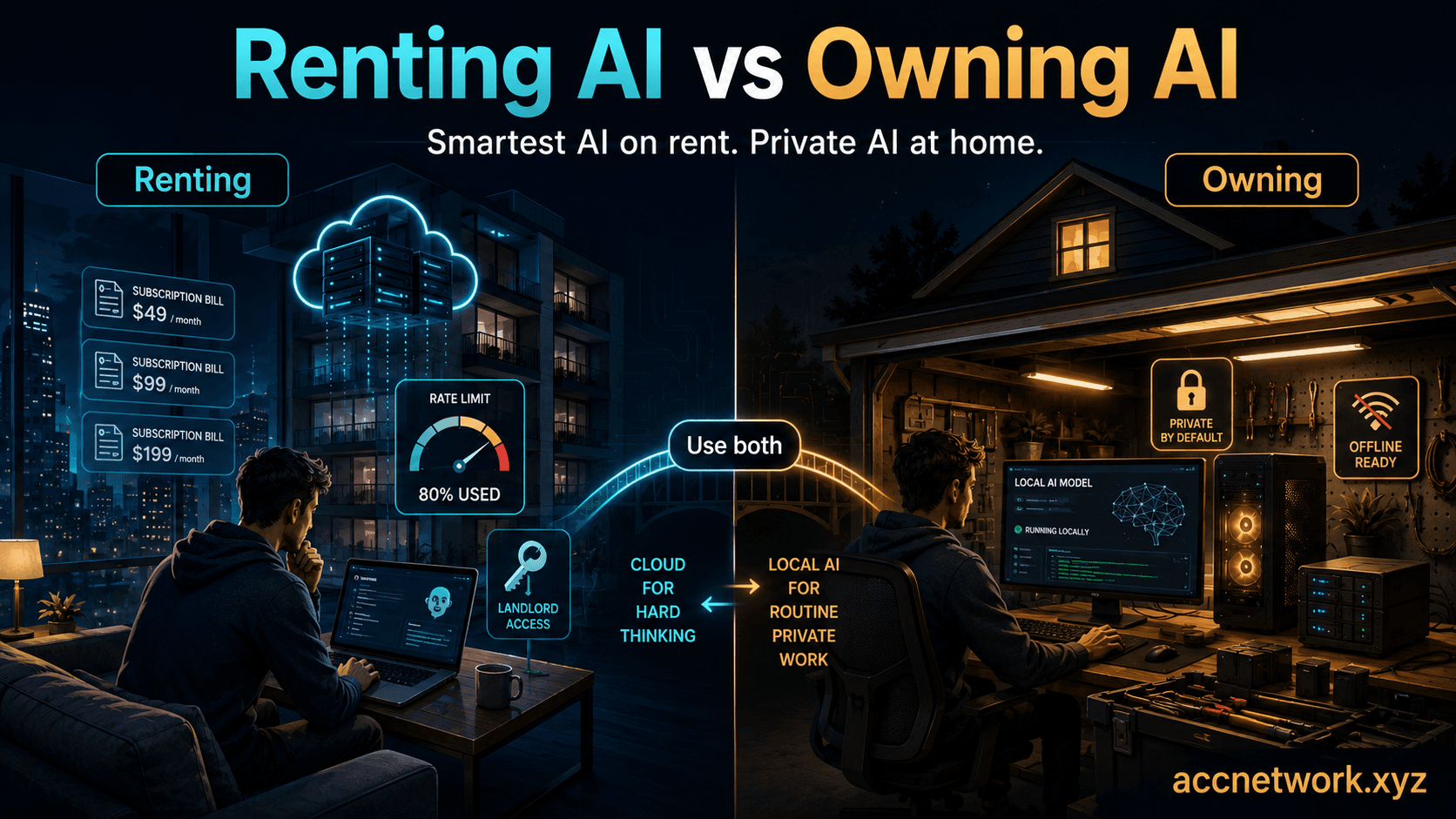
Think of it like where you live. Renting AI is an apartment. You always get the newest, nicest place, because ChatGPT, Claude, and Gemini are the best AI that exists, and they get smarter every few months without you lifting a finger. But the landlord sets the rules. Prices go up. You hit limits. Sometimes the model you liked gets retired and replaced with one that answers differently.
Owning AI is buying a small house. It is yours. It works when the internet is down. Nobody reads what you put into it, and nobody can rate-limit it or reprice it or take it away. But the house you can afford is noticeably smaller than the apartment you were renting.
Let me kill the fantasy right here, because it saves you money: you are not buying a home version of ChatGPT. You are buying something meaningfully dumber that happens to be 100% yours. A home machine is genuinely useful for a lot of everyday work. It is not going to out-think Claude on your hardest problem. Anyone who tells you otherwise is selling something.
So the real question is not "local or paid?" It is quieter than that: which jobs is the smaller, owned machine good enough for, and what does owning that floor of capability actually cost you?
What owning gets you
A fixed floor of AI capability nobody can rate-limit, reprice, retire, or read. It works offline, and your data never leaves the house.
What renting gets you
The smartest AI that exists, updated for you automatically, but on someone else's terms, with limits and prices they control.
The honest thesis
Owning does not replace renting. It shrinks the bill for routine work while you keep renting the smartest models for the hard stuff.
Room and speed
The Only Two Specs That Matter
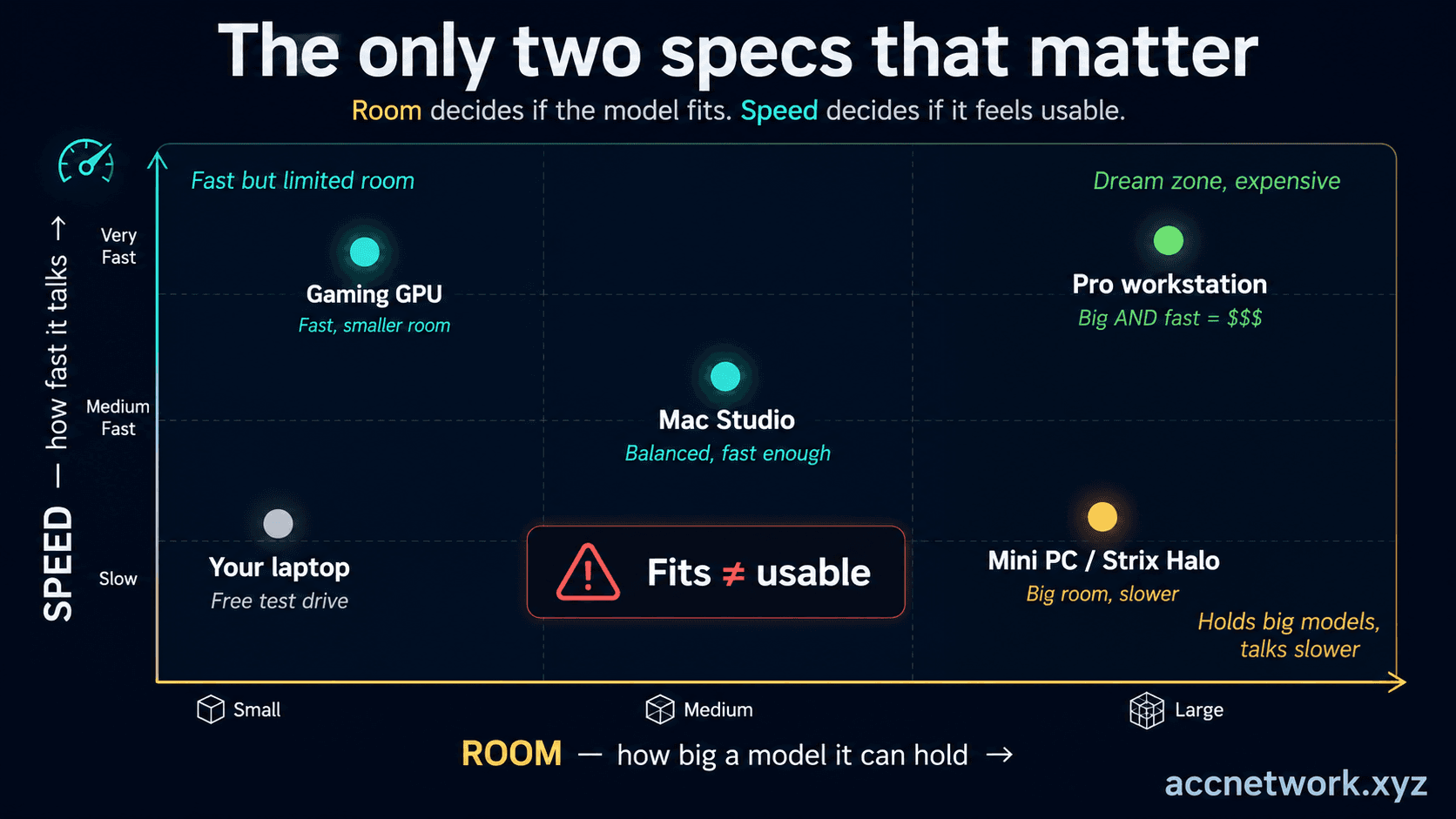
Here is the entire technical story in two words: room and speed.
Room is whether the computer's brain is big enough to hold the model at all. (Sales pages call this memory, VRAM, or unified memory, but it is the same idea.) A model is a big file. If it does not fit in the machine's fast memory, it does not run, full stop.
Speed is how fast the machine talks back once the model fits — think words per second. (Spec sheets call this memory bandwidth.) This is what decides whether using it feels like a conversation or like watching a video buffer.
Almost every machine you can buy is good at one of these and weak at the other. That is the whole game. And here is the trap to remember before you shop: "it fits" and "it is usable" are two different sentences. A machine can load a giant model and then answer slower than you can read. That is not a tool. That is a demo.
One friendly surprise: some of the biggest models actually run faster than smaller ones, because certain big models only wake up a small part of their brain for each answer instead of the whole thing. On the same home box, one of these giants answered at around 11 words per second while a model a third of its size crawled along at four or five. Do not let total size scare you. How much of the brain wakes up per answer matters more.
Room (can it hold the model?)
A hard yes or no. If the model does not fit in memory, nothing else matters.
Speed (how fast does it answer?)
Decides whether it feels usable. Single-digit words per second is a demo, not a daily tool.
The trap
Sales pages brag about room and go quiet about speed. Fits does not mean usable.
From $0 to $8,000 and up
The Budget Ladder
Here is the heart of it. Five rungs, from free to pro. For each one: what it costs, what it actually feels like to use, what models fit, and the one thing it cannot do. Prices are current as of July 2026 and they move monthly, so buy by rung, not by exact number.
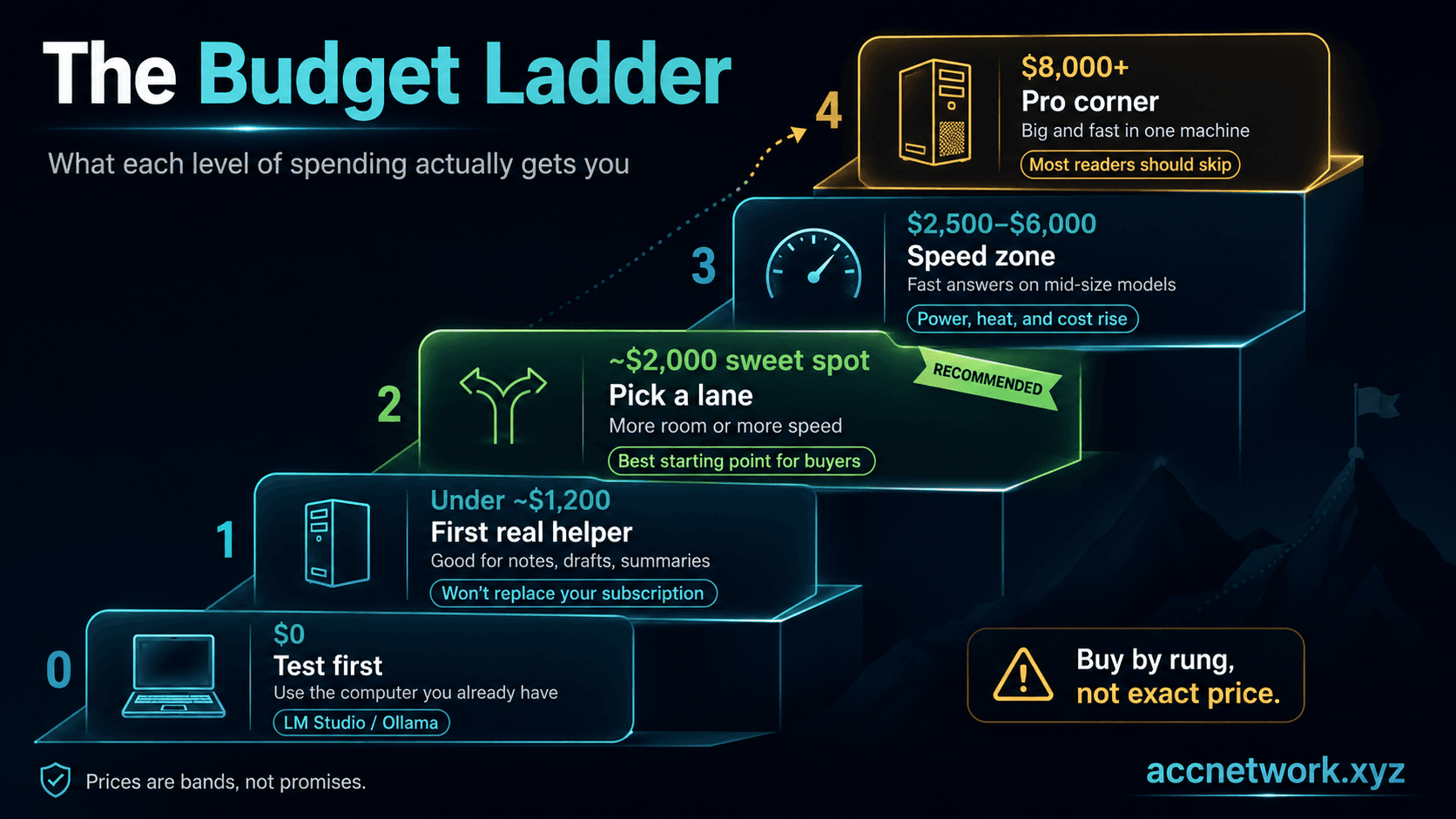
Rung 0 — Free: the computer you already have
Download LM Studio or Ollama and run a small model tonight. If you have enough storage, even a used iPhone or a cheap Android phone can run tiny local models now. Start with something like Gemma 4 E4B on a laptop, or Google's mobile-friendly Gemma 3n E4B LiteRT preview if you want to test the phone route. Most people learn in one evening whether home AI is plenty or hopeless for their task, and either answer saves money. Likely models at this rung: Gemma 4 E4B, Gemma 3n E4B, Llama 3.1 8B, Qwen 2.5 7B, and other small open models you can browse on OpenRouter Models. What it can't do: anything big or fast. It is a taste test, and that is the point.
Rung 1 — Under about $1,200: your first real helper
An entry Mac mini (from about $799) or a used gaming card like the RTX 3090 ($700 to $1,000 secondhand). A capable assistant for notes, first drafts, tagging, and summaries. Likely models at this rung: Gemma 4 E4B, Llama 3.1 8B, Qwen 2.5 7B, Mistral Small variants, and some 14B models once quantized. What it can't do: replace your subscription. Watch used cards for no warranty, heat, and ex-mining wear, and insist on a stress test before money changes hands.
Rung 2 — The roughly $2,000 sweet spot: the fork in the road
Two machines cost about the same and are good at opposite things. A Strix Halo mini-PC (about $1,800 to $2,200) holds very large models but talks at a moderate pace. A Mac Studio M4 Max ($2,499) holds medium models but answers noticeably faster. Likely models at this rung: Qwen3 30B class models, qwen3-coder, GPT-OSS 20B, Gemma 27B-sized families once quantized, and other midsize open models you see ranked on OpenRouter and Arena. Picking a lane is the decision. What it can't do: be great at room and speed at once.
Rung 3 — $2,500 to $6,000: the speed zone
Fast answers on solid mid-size models, usually an RTX 5090 build (the card lists near $2,000 but has been selling around $2,700 to $3,500). This is also where NVIDIA's DGX Spark lives ($3,999 to $4,699), which is a developer-compatibility box, not a value buy. If you do not already know why you would need it, you do not. Likely models at this rung: Qwen3 30B and coder variants at better speeds, GPT-OSS 20B, many 32B-class models, and some 70B-class models if you are willing to trade speed. This is also where developers start running serious local coding models. They still trail the paid tools, but if you can live with slower output they are good enough for real work. What it can't do: hold the very largest models.
Rung 4 — About $8,000 and up: the pro corner
One card, the RTX PRO 6000 (roughly $7,500 to $9,000+), that is both big and fast, the first rung where you stop choosing. Small-team and serious-operator territory. Likely models at this rung: strong 70B-class open models at usable speed, bigger mixture-of-experts models, and custom setups for teams that want the biggest local models they can realistically manage. What it can't do: justify itself for a hobbyist. Most readers should wave and keep walking.
A fast mental model before you shop
Local Model 101
Parameter size is the rough size class of a model. The easy shortcut: 1B of model needs roughly 1GB of memory, give or take. Not perfect math, but good enough to keep you from buying blind. One more word you will see everywhere: quantized. That just means the model got shrunk to fit, like compressing a photo. Smaller file, slightly blurrier answers, and it is the normal way people run AI at home.
The practical ladder is simple. Around 1B is nano: tiny task models for OCR, voice, or embedded helper jobs. Around 7B to 9B is micro: your starter local chatbot range. Around 27B to 35B is where many power users start saying: okay, this is actually useful. Around 70B and up is where the costs and tradeoffs get serious fast.
A second shortcut helps if you think in product tiers instead of parameter counts. Cheap hardware gets you a basic chatbot experience. Around the $1,000 to $2,000 range gets you a decent local helper. Beyond that you can reach stronger local coding and reasoning assistance, but some top-tier experiences are still cloud-only and stay there for a reason.
| Tier | Rough size | What it feels like | Typical hardware |
|---|---|---|---|
| Nano | ~1B | Tiny single-purpose models for OCR, speech cleanup, or embedded app features. | Phones, edge devices, or any modern laptop |
| Micro | ~7B to ~9B | Starter local chatbot range for basic writing, summaries, and lightweight help. | Used Android phone, older laptop, Mac mini, or entry desktop |
| Mid | ~27B to ~35B | The local sweet spot for many power users. Better writing, stronger reasoning, better coding help. | Mac Studio, Strix Halo mini-PC, RTX 3090 desktop, or similar |
| Large | ~70B+ | Real enthusiast or pro territory. Better output, much higher cost, and still not a guaranteed match for premium cloud models. | High-end RTX desktop, RTX PRO workstation, or multi-GPU build |
| Cloud-only top tier | N/A | The top-end experience people compare to premium Claude or ChatGPT tiers. Best for hardest reasoning and coding work. | Still better rented than built for most people |
Nano — ~1B
Tiny single-purpose models. Think OCR, speech cleanup, or embedded app features.
Micro — ~7B to ~9B
Good starter chat and assistant models for basic writing, summaries, and lightweight help.
Mid — ~27B to ~35B
The practical local sweet spot for many power users. Better writing, stronger reasoning, better coding help, higher hardware demands.
Large — ~70B+
Real enthusiast or pro territory. Better output, much higher cost, and you still do not magically equal premium cloud models.
Reality check
The model list changes fast. Use OpenRouter or live leaderboards to see what people actually rate highly right now, then match that to the rung you can afford.
What to Run at Home vs What to Keep Renting
Forget the machines for a second. The smartest way to decide is by the job, not the gear.
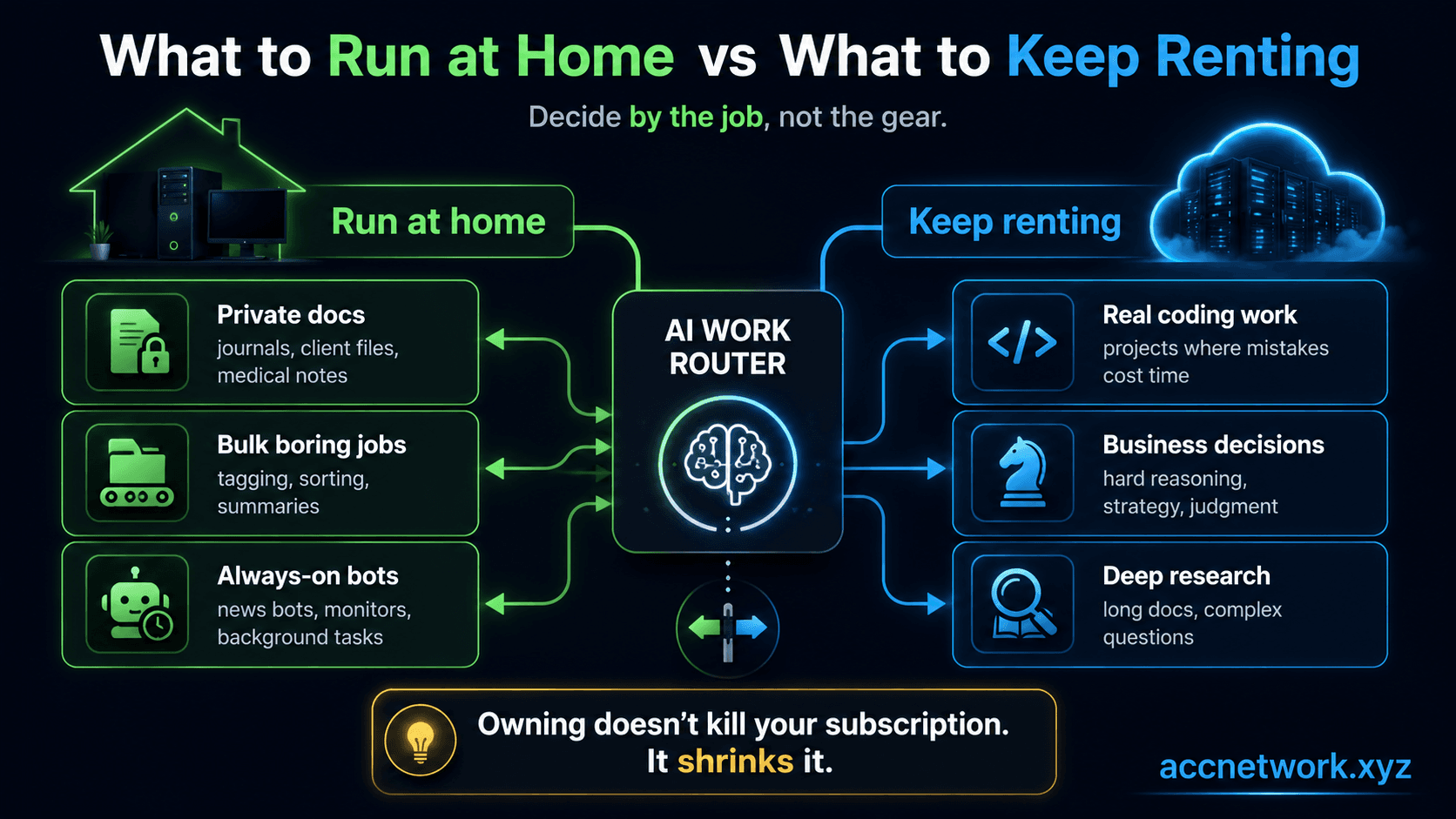
Run it at home when the work is private, repetitive, or always-on. Private stuff — journals, client documents, medical or financial paperwork — should never leave your house. For that work, home AI is not the cheaper option. It is the only right one. Boring bulk jobs like tagging and summarizing hundreds of items come out close to the paid tools in quality, and volume is exactly where rental bills quietly pile up. And always-on background bots, like my AI News Bot, can run on a small home box for free instead of billing you per call.
Keep renting anything where you need the smartest answer: coding a real project, a business decision, reasoning through a long document. This is where the big paid models are still clearly ahead, and being 15% wrong is expensive.
Here is the line to leave with, because it is the honest one: owning does not kill your subscription. It shrinks it. You hand the cheap, boring 80% of your AI work to the machine in your house, and you keep renting the smartest models for the hard 20%. Anybody selling you "cancel your subscription, here's the math" left out the quality gap.
Run at home
Private documents you can't send out, high-volume boring jobs (tagging, sorting, summarizing), and always-on background bots.
Keep renting
Real coding projects, business decisions, and long, hard reasoning, anywhere the smartest possible answer matters.
The hybrid truth
Route the cheap 80% to the box you own and rent the hard 20%. Local shrinks the bill and caps its growth.
Show your work
The Actual Math
So does a home box ever pay for itself? Let's use real numbers and show the work, so you can plug in your own bill.
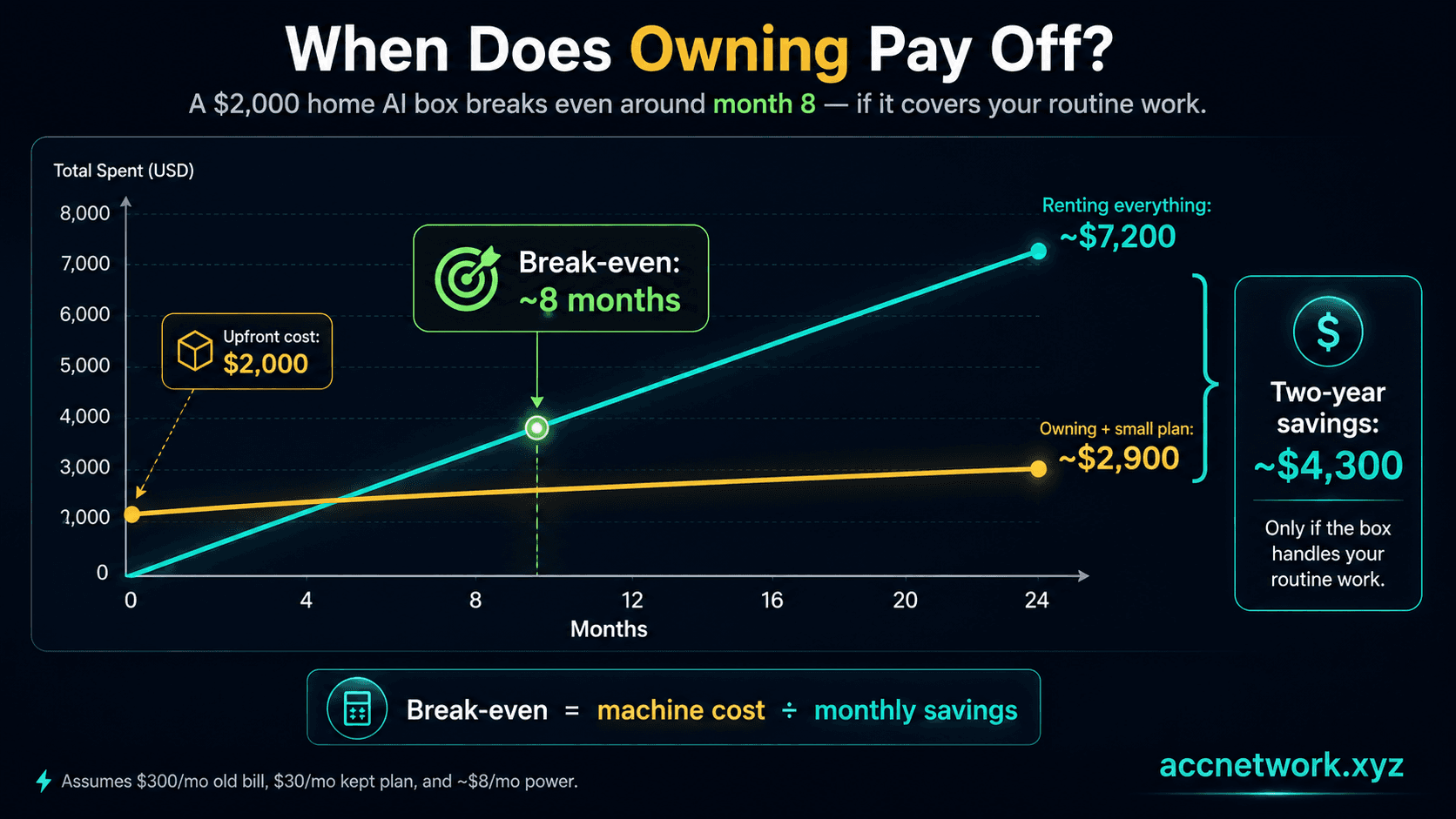
Say you buy a $2,000 machine. You were paying $300 a month to rent. After buying, you do not go to zero. You keep one smaller subscription (about $30 a month) for the hard jobs, and the machine costs a little to run. Electricity for a machine like this is only about $8 a month in normal home use. That is real math: the U.S. average electricity price is about 18.6 cents per kilowatt-hour, and a low-power box sipping power most of the day barely moves your bill.
Here is the formula, plain: months to break even = price of the machine divided by (old bill minus electricity minus the smaller subscription you keep).
Run our numbers: $300 minus $8 minus $30 leaves $262 saved every month. Then $2,000 divided by $262 is about 8 months to break even. After that, the machine is money in your pocket. Over two years, renting the whole time costs around $7,200, while owning plus a small subscription costs around $2,900. That is roughly $4,300 saved over two years, if the home box genuinely covers that share of your work. That "if" is the whole ballgame, which is why the job comes before the gear.
One honest asterisk: the fast, power-hungry machines (the RTX 5090 rung) cost more like $18 to $25 a month in electricity even for normal use, because they draw real power just sitting there. Cheap to run is a feature of the lower rungs, not a guarantee.
The Part Nobody Prices: Owning
Everything above is a spreadsheet. But there is a value to owning that does not show up in the monthly cost, and it cuts both ways.
Go back to that April journal entry: "Can't use until 4/23 unless I upgrade." That is the thing you are actually buying: a floor of capability nobody can rate-limit, reprice, or switch off on you. When you rent, you live with the landlord's decisions. When you own, the floor is yours. Not the best AI, but yours, on your terms, offline and private. For some operators that peace of mind is worth thousands. For most hobbyists it is worth about zero, and that is a fine answer too.
But owning has its own landlord, and this year proved it. Apple quietly cut the memory on its biggest Mac Studio. The top configurations that used to hold the largest home models are simply gone for new buyers, capped now at 96GB because of a global memory-chip shortage. A whole tier of home-AI capability vanished overnight, not because the chip changed, but because the supply chain did. Renters answer to landlords. Buyers answer to supply chains.
That is the grounded version of the ownership argument: it is insurance against other people's decisions. Price it honestly. Buy it if the task justifies it, not because owning feels good.
FAQ
Can a home computer really run ChatGPT?
No. ChatGPT, Claude, and Gemini are enormous models that live in data centers, and you cannot download them. What a home computer can run is a smaller, open version of that kind of AI, which is great for everyday writing, summarizing, and tagging, but clearly behind the paid tools on hard coding and reasoning.
Is a gaming PC good enough?
Often, yes. A gaming graphics card is exactly the kind of room and speed you need, and a used RTX 3090 (around $700 to $1,000) is one of the better-value ways in. Just mind the power draw, the heat, and the no-warranty risk of buying used.
How much should a beginner spend?
Usually $0 at first. Run a free model on your current computer for an evening before buying anything. Most people find out that it is either enough, or that they should keep renting, and both answers save money.
Will this replace my subscription?
No, it shrinks it. A home box handles the cheap, repetitive, private work while you keep renting the smartest models for the hard problems. Owning trims the bill; it does not cancel it.
Which small models do people actually run at home right now?
As of mid-2026, common entry picks include Gemma 4 E4B, Llama 3.1 8B, and Qwen 2.5 or Qwen3 small variants. In the popular mid-size sweet spot, the Qwen3 30B family is the go-to. The app you install, LM Studio or Ollama, always shows what is current, so you do not have to memorize names.
Where to go next
Keep the momentum going with the daily brief, the full blog archive, the glossary, and the story behind ACC Network.