

Learn what an AI agent is, how it differs from a chatbot or workflow, where it helps, where it fails, and how beginners can test one safely.
AI agents are everywhere right now.
Every tool seems to have one. Every company wants to build one. Every social feed has somebody claiming agents will replace entire teams by next Tuesday.
Most of that noise skips the first question. What is an AI agent?
The label is loose. Some companies call a fixed automation an agent. Others use the word only for systems that choose their own next step. The useful question is not what the product calls itself. The useful question is how much freedom it has and what it is allowed to do.
Quick answer
What is an AI agent?
An AI agent is software that uses an AI model to work toward a goal. It can decide what to do next, use approved tools, check what happened, and continue through several steps. A normal chatbot usually gives you a response. An agent can take action.
New to AI tools in general? Start with the beginner AI tools guide. If terms like model or prompt still feel fuzzy, keep the ACC glossary open while you read.
Quick Start
What to do first
Start with one small task. Choose a bounded job with a result you can check before anything important happens.
Keep access narrow. Use copied, non-sensitive data and read-only permissions for your first test.
Ask for a draft. Do not let an experimental agent publish, send, delete, or spend without your approval.
Use the simplest tool that works. If one prompt or a fixed workflow handles the job, you probably do not need an agent.
Why everyone is suddenly talking about agents
Chatbots proved that AI could write, explain, summarize, and answer questions. Agents are the next obvious pitch because they promise to move from talking about work to doing parts of the work.
If you ask a chatbot to plan a trip, it can write an itinerary. An agent could search options, compare them against your budget, save the best choices in a document, and ask which one you want to book.
If you ask a chatbot to help with a weekly report, it can give you a template. An agent could read approved files, pull out the useful updates, flag missing information, and prepare the first draft.
The AI model handles the language and decision-making. Tools let it act. A loop lets it check the result and decide what to do next. That combination is useful. It is also where the risk starts to grow.
A chatbot, a workflow, and an agent are not the same thing
These categories are not perfectly clean. Even the companies building this technology use the terms differently. Still, this simple breakdown will help.
| Type | What it does | Simple example |
|---|---|---|
| Chatbot | Responds to your prompt and usually waits for the next instruction. | You paste meeting notes into a chatbot and ask it to create a task list. |
| Workflow | Follows steps that somebody defined in advance. | A new form triggers a summary, a spreadsheet update, and a notification in the same order every time. |
| Agent | Gets a goal, approved tools, and room to decide what should happen next. | It inspects the input, chooses relevant files, searches for missing information, and prepares a draft for review. |
A chatbot responds
You direct each step. It gives you an answer and waits.
A workflow follows a path
The path stays mostly the same every time. This works well when the task is predictable and consistency matters.
An agent chooses part of the path
That flexibility can make it more useful than a fixed workflow and less predictable at the same time.
A simple example that makes the difference clear
Imagine you need a weekly client update.
A chatbot can turn notes into a polished update after you collect the notes and paste them in.
A workflow can grab every document in a specific folder each Friday, summarize them in the same order, and place the result in a template.
An agent can inspect the folder, decide which documents are relevant, notice that one project is missing an update, search an approved source for the latest status, and prepare a draft for your review.
The agent is not magic. It is making choices inside boundaries that somebody created. If those boundaries are sloppy, it can choose the wrong file, misunderstand the goal, or confidently prepare a bad update.
A real example
A simple agent I use on my own computer
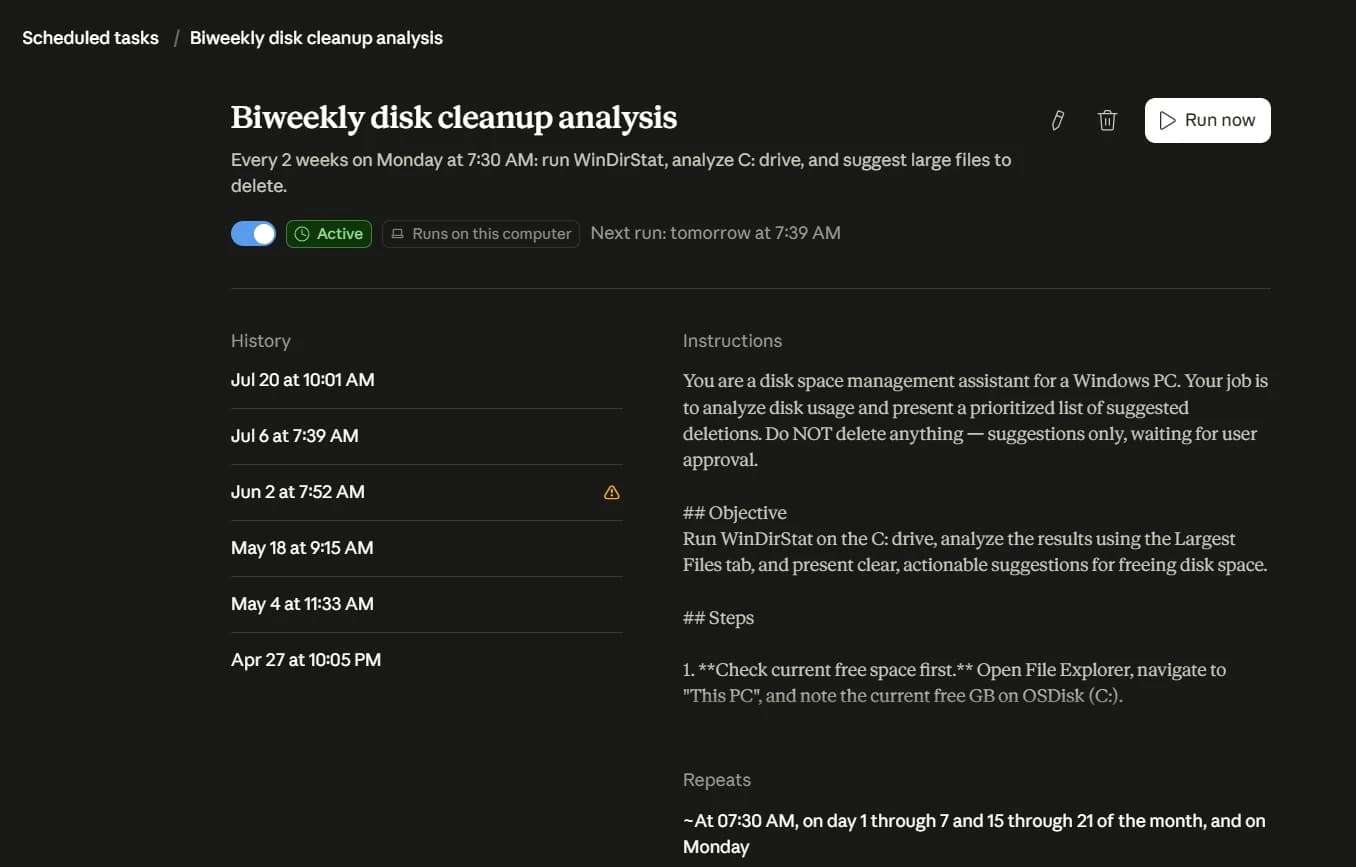
One of my personal agents handles a boring job I used to forget. Every two weeks, it runs WinDirStat, checks what is taking up space on my Windows computer, and gives me a prioritized list of large files I could remove.
The important part is what it cannot do. It does not delete anything. It investigates the problem and makes suggestions, but I approve every deletion myself.
I use it because checking disk space manually is repetitive and easy to put off. The agent saves me the inspection time without getting permission to make an irreversible decision.
This is a useful first agent because the goal is narrow, the result is easy to review, and a mistake does not immediately change anything on the computer.
Another real example
What a larger multi-agent system looks like
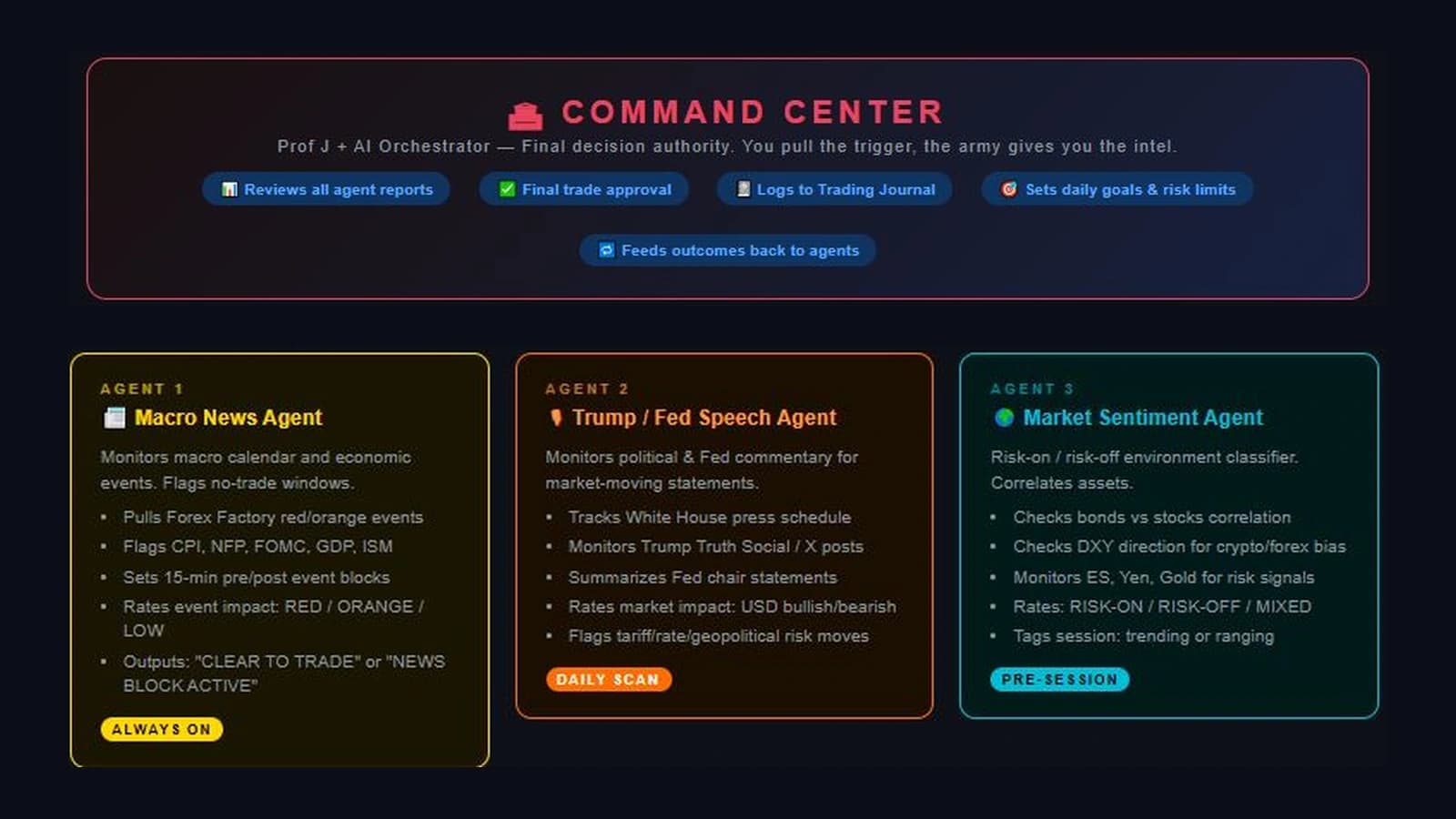
I also built a larger system called the Trading Army. Instead of asking one AI model to handle every part of a trading decision, I split the work among specialized agents.
The Macro News Agent watches economic events. The Trump and Fed Speech Agent monitors public statements that could move markets. The Market Sentiment Agent looks at the broader risk environment. Other agents inspect chart structure and watch for specific setups.
Those agents send their findings to a Command Center. The Command Center reviews the reports, applies my goals and risk limits, records the outcome, and produces one combined briefing.
I use this structure because one giant prompt trying to do everything becomes hard to trust. Smaller agents have clearer jobs. Their work is easier to inspect, and I can see which part of the system produced a conclusion.
Why I keep risk and review separate
The Trading Army is not an automatic trading bot. The system gives me information, but I make the final trade decision.
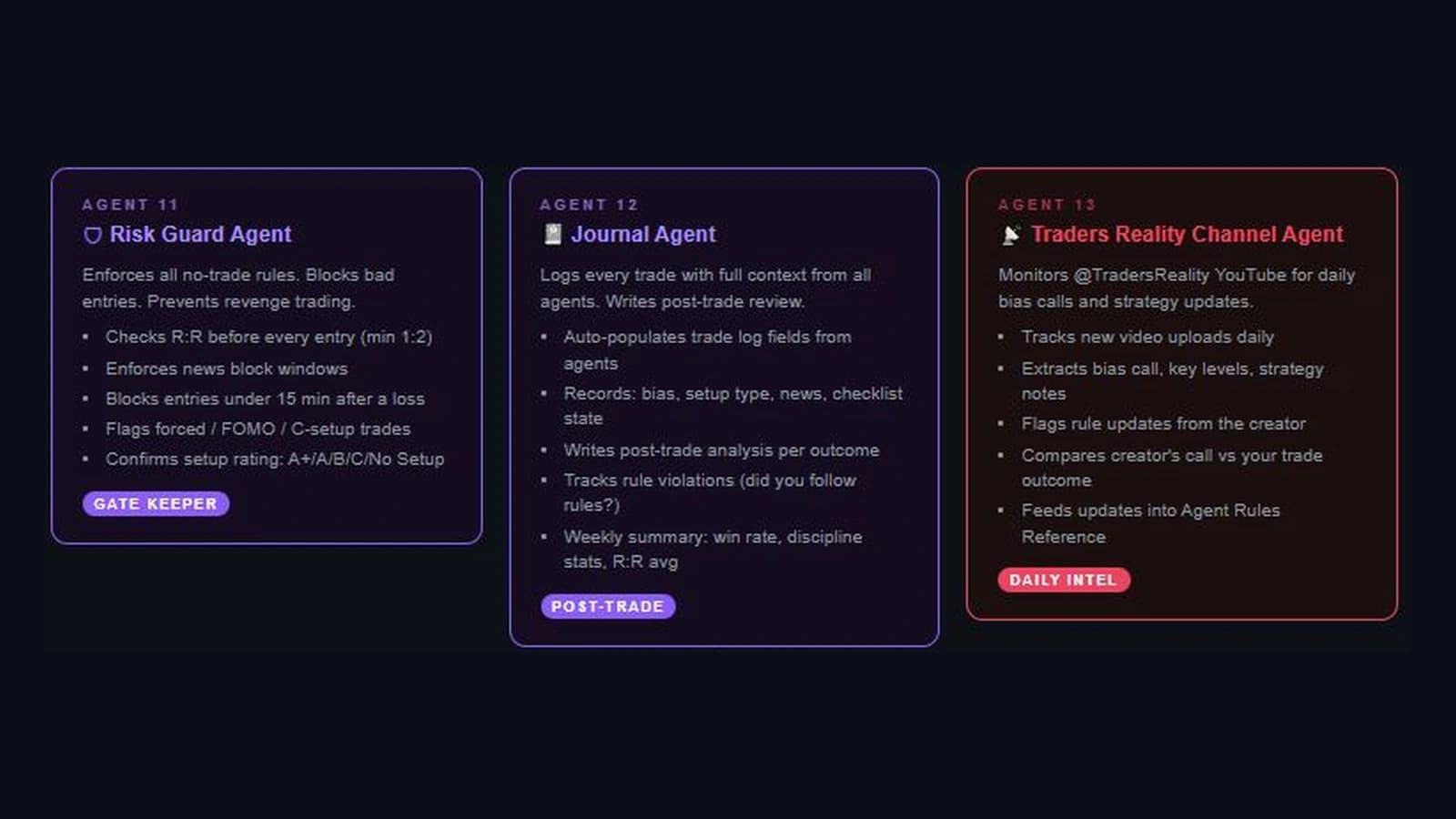
A Risk Guard Agent checks whether a possible trade follows my rules. A Journal Agent records the setup, the decision, and the result. Another agent monitors educational updates that may affect the strategy rules.
I use these agents because finding a possible trade is only part of the job. I also need something that can slow me down, challenge a bad entry, document what happened, and help me review whether I followed my own process.
That is the bigger lesson. More agents do not automatically make a system better. Each agent needs a clear responsibility, and important actions still need a human decision.
This is an example of how I organize my own research and decision process. It is not financial advice and it does not promise profitable trades.
What makes an AI agent work
An agent needs more than a clever prompt. The goal, tools, feedback, and limits around the model determine what it can do and how much damage a mistake can cause.
A goal
The agent needs a clear result. Help with my business is too vague. Read these approved notes and draft a weekly client update is much better.
An AI model
The model reads the instructions, reasons about the task, and decides what to do next. It can still make mistakes. Giving it tools gives those mistakes more places to travel.
Tools
Tools let the agent interact with search, files, spreadsheets, calendars, code, email, or other software. Each tool should have a clear purpose and limited access.
Feedback
After using a tool, the agent checks what happened and decides whether to continue, try another step, ask for help, or stop.
Limits
Stopping rules, permission limits, and human checkpoints keep the agent from looping, repeating mistakes, or taking actions that should require approval.
What agents are actually good at
Agents make the most sense when the goal is clear but the exact steps can change.
The best early use cases are bounded, reviewable, and easy to reverse. If an agent drafts the wrong checklist, you can fix it. If it sends the wrong payment, deletes a customer record, or publishes a bad statement, the damage is harder to undo.
Document work
Read a small set of documents and create a draft summary.
Research
Compare information from approved sources and organize it into a brief.
Support
Sort requests and prepare suggested replies for human review.
Code
Review files, run tests, and report what failed before changes are approved.
Quality checks
Check a list of items and flag the ones that need human attention.
Why the hype gets ahead of reality
The internet likes the idea of an AI employee that never sleeps, never complains, and handles everything.
Real agents are messier. They can misunderstand the goal, choose the wrong tool, miss important context, and build several more steps on top of a bad assumption.
Agents can also take longer and cost more than a normal prompt or a fixed workflow. Anthropic recommends starting with the simplest approach that works because a single model call or a predictable workflow is often enough.
You do not get extra points for using an agent when a checklist, prompt, or basic automation solves the job.
What can go wrong
More freedom creates more places for a mistake to turn into a real action. That does not make agents useless. It means the setup matters as much as the model.
Small mistakes can stack up
An agent can use one wrong answer to choose the next action, then use that result to make another decision.
Tools create real consequences
Once an agent can send messages, edit records, run code, or access private files, its output is no longer just text on a screen.
Outside content can contain bad instructions
An agent may read instructions hidden in websites, files, emails, or images. OWASP calls this prompt injection. The agent should not treat every instruction it reads as trusted.
Private information can leak
Broad access can expose files or records the task never needed. Start with the minimum access required.
Polished output can fool people
A clean report is not proof that the research was correct. Review still matters.
Try this first
A safe first experiment
Do not start by connecting an experimental agent to your email, payment account, customer database, or live website.
Create a folder with copies of five non-sensitive documents. Give the agent read-only access if the tool allows it. Ask it to summarize the documents and create a draft checklist.
Then compare the result with what you would have produced using a normal chatbot prompt. Start with read-only access, copied data, and actions you can reverse.
Use copies
Do not test against the only copy of your files.
Keep data non-sensitive
Leave private customer, financial, health, and account information out of the experiment.
Stay read-only
Do not allow editing, sending, publishing, deleting, or spending during the first test.
Review every result
Check the facts, the chosen steps, and the final output before you trust the workflow.
Set a stopping point
Limit how long the agent can run, then remove access when the test is over.
Do you actually need an agent
An agent may be useful when the goal is clear, the steps can vary, and the system needs to choose between tools or sources. It also helps when the output can be checked before anything important happens.
Use a chatbot or a fixed workflow instead when the steps are predictable, reliability matters more than flexibility, or one good prompt already solves the problem.
Keep a person in control when the task involves money, private data, publishing, deletion, healthcare, legal decisions, or important account permissions.
Question 1
Can I describe the goal in one sentence?
Question 2
Does the task really need flexible decision-making?
Question 3
Can I limit the tools and permissions?
Question 4
Can a person review the result before it matters?
The real takeaway
AI agents are not digital employees waiting to take over your entire week.
They are systems that give an AI model a goal, a set of tools, and some freedom to decide what happens next. That can be powerful. It can also be expensive, unreliable, and risky when the goal or permissions are loose.
Do not start with maximum autonomy. Start with one small task, narrow access, and a draft you can review.
The best agent is not the one with the most tools. It is the one that saves time without creating a bigger problem than the task it was supposed to solve.
If you want AI explained in plain English without living online all day, subscribe to the ACC Network newsletter for useful updates, beginner guides, and the signal that actually matters.
FAQ
What is an AI agent in simple terms?
An AI agent is software that uses an AI model to work toward a goal, choose some of its next steps, use approved tools, and adjust based on the results.
How is an AI agent different from a chatbot?
A chatbot usually responds to a prompt and waits for the next instruction. An agent can continue through several steps, use tools, and take limited actions toward a goal.
How is an agent different from a workflow?
A workflow follows a path that was defined in advance. An agent has more freedom to choose which step or tool should come next. The terms are used loosely, so some products may call fixed workflows agents.
Does an AI agent work on its own?
It can work with some independence inside the access and limits it was given. That does not mean it should operate without oversight. Important decisions and high-impact actions still need human review.
Are AI agents safe?
They can be used safely for bounded tasks, but they create risks when they have broad permissions, sensitive data, or the power to take important actions. Start with narrow access, low-risk information, and review before anything is sent, changed, or published.
Do I need to know how to code to use an AI agent?
No. Some tools offer simple interfaces for building or using agents. Coding becomes more useful when you need custom tools, stronger controls, testing, or integration with other systems.
What is a good first AI agent for a beginner?
Try an agent that reads copies of non-sensitive documents and creates a draft summary or checklist. Keep it read-only and review everything it produces.
Where to go next
Keep the momentum going with the daily brief, the full blog archive, the glossary, and the story behind ACC Network.