


A beginner-friendly explainer on AI model releases, including what changes during a launch, how to read the announcement, and when a new model is worth your attention.
AI model releases can make the whole space feel louder than it needs to be. One company announces a new model. Another company posts benchmark charts. X turns into a scoreboard. You see people saying one model is dead, another one is king, and beginners are left wondering whether any of this matters for normal work.
Most of the time, the answer is yes, but not in the dramatic way the internet makes it sound. A model release matters when it changes what you can actually do, how much it costs, how fast it runs, or how much you can trust it for the kind of task in front of you.
If you are learning AI, you do not need to memorize every model name or benchmark. You need to understand what changed, who the release is for, and whether it affects the tools you already use. That is a much calmer way to follow the space.
This guide breaks down model releases in plain English. No research-lab language. No pretending every launch needs to interrupt your day. Just a simple filter for deciding what changed, whether it matters, and what to test next.
Quick answer
What is an AI model release?
An AI model release is when a company makes a new or updated AI model available to users, developers, or businesses. The release may bring better reasoning, faster responses, lower costs, stronger coding, better image or video skills, longer context, new safety changes, or new ways to use the model inside apps. Beginners should care because model releases can change which tools are useful, what tasks are now easier, and whether an upgrade is actually worth paying attention to.
If terms like model, context window, token, or benchmark are still fuzzy, keep the ACC glossary open while you read. For the short version of important launches, the daily newsletter is built to help you track the signal without living online.
Quick Start
What to do first
Look for what actually changed. A useful release usually improves reasoning, speed, cost, coding, images, voice, memory, context, tool use, or reliability.
Check who the model is for. Some releases matter more for everyday users, while others are mostly for developers, enterprise teams, or people building apps on an API.
Do not trust the hype by itself. Benchmarks and demos are helpful, but your own test tasks tell you whether the model is better for your real work.
Compare the details in one or two places. Use a model directory and a leaderboard to check context length, cost, strengths, and availability before listening to random feed takes.
Switch only when there is a reason. A new model is worth trying. It is not automatically worth rebuilding your whole workflow around.
A model is the engine behind the AI tool
When people talk about ChatGPT, Claude, Gemini, Grok, Perplexity, or Copilot, they often mix up the app with the model. The app is the interface you use. The model is the underlying system that reads your prompt and generates the response. A model release usually means that engine has been updated, replaced, or made available in a new way.
That distinction matters because the same app can change a lot when the model changes. It may answer faster. It may write better code. It may handle longer documents. It may understand images more clearly. It may make fewer mistakes on certain tasks. The button you click might look the same, but the engine behind it may be different.
Plain-English version
The app is the car you sit in. The model is the engine doing the work.
Beginner takeaway
When a company announces a model release, ask what the new engine does better than the old one.
What usually changes in a model release
Not every release changes the same thing. Some are big jumps that unlock new workflows. Others are smaller upgrades that improve speed, cost, or reliability. The mistake is treating every release like it has the same weight.
The best way to read a model launch is to look for the specific improvement. Did it get better at reasoning? Can it read more information at once? Is it cheaper for developers to use? Does it generate images, audio, or video? Does it call tools more reliably? Does it work better on a phone or inside another app?
Common upgrades
Better reasoning, stronger coding, longer context, faster responses, lower API cost, improved safety, better image understanding, stronger voice, and more reliable tool use.
Common trap
Seeing a new name and assuming it is better at every task. Most releases have strengths, tradeoffs, and use cases.
Why benchmarks are useful but not enough
Model releases usually come with benchmark charts. These can be useful because they give a rough signal of how a model performs on certain tests. The problem is that benchmarks are not your life. A model can rank well on a test and still feel awkward for your writing, research, customer emails, coding style, or daily workflow.
Beginners should read benchmarks as clues, not commandments. A high score can tell you the model is worth testing. It should not replace your own judgment. The real question is whether the model helps you finish the work you actually care about.
Good use of benchmarks
Use them to understand where a model may be strong, especially in reasoning, coding, math, vision, or speed.
Better final test
Run your own three to five prompts across the old model and new model, then compare the answers side by side.
Release filter
What to look for when the leaderboard screenshots start flying
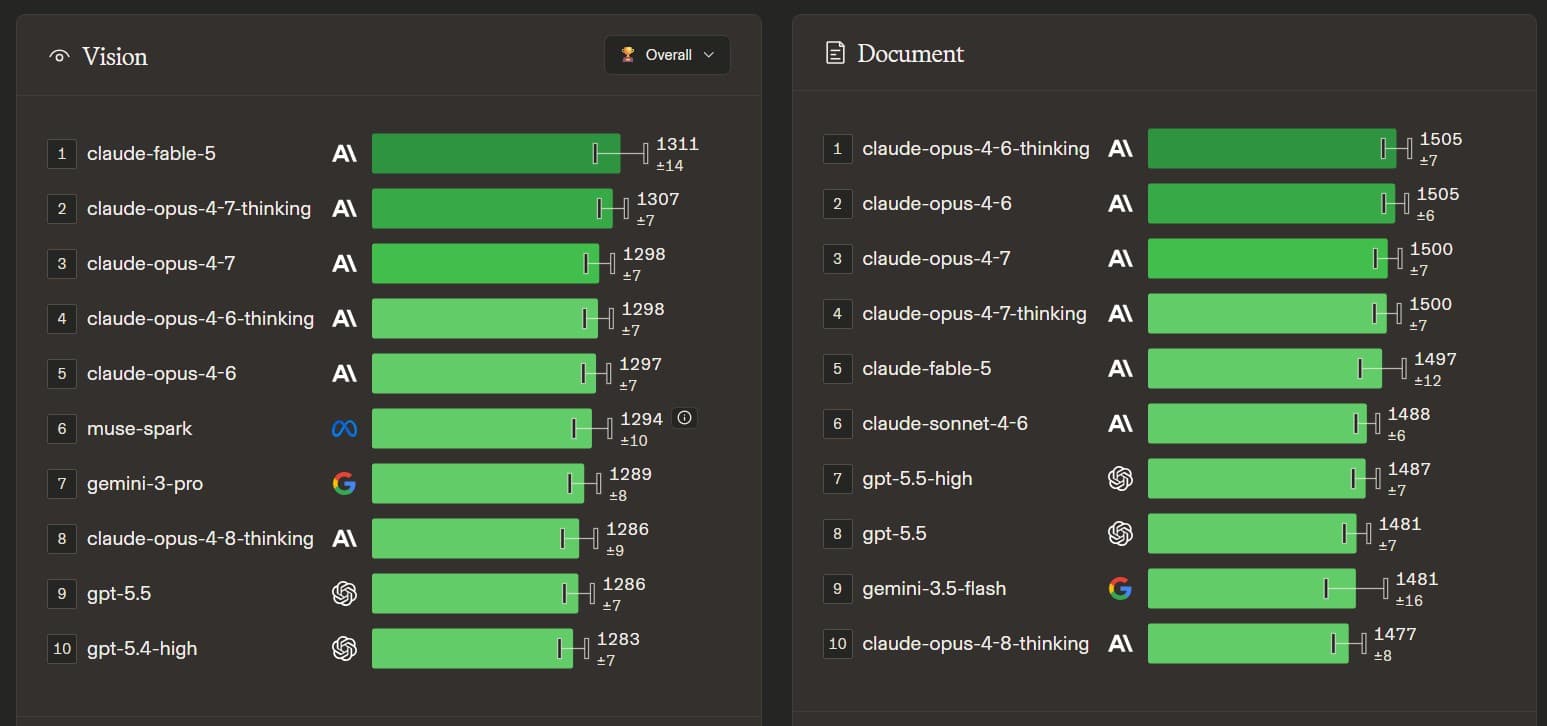
When a new model drops, people usually share ranking screenshots first. That is useful, but only if you read the category before you react. A model can be near the top for vision and still not be the best choice for documents, coding, or everyday writing.
In a comparison like this, Claude Fable 5 shows up high for vision, while Claude Opus and OpenAI GPT 5.5 models also show up in document rankings. The takeaway is not that one model wins forever. The takeaway is that you should match the model to the job.
Look at the category first
Vision, documents, text, coding, web development, math, and reasoning are different jobs. A model can be strong in one and average in another.
Look at the score gap
If the top models are only a few points apart, the practical difference may be smaller than the internet reaction makes it sound.
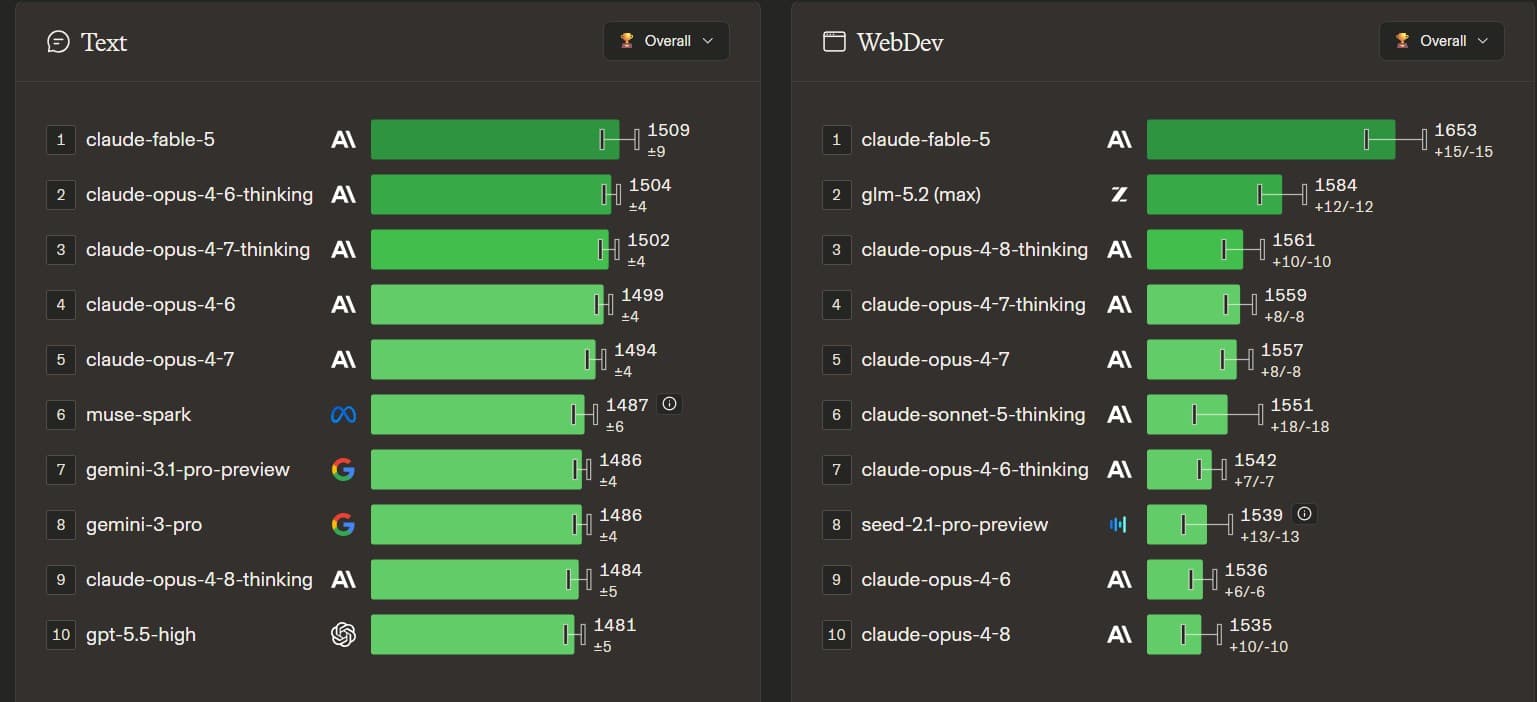
Text and web development scores are not the same thing
This is where beginners get tricked. They see one big number and assume the model is better at everything. But text ranking and web development ranking are measuring different kinds of work.
If you are writing a newsletter, the text ranking matters more. If you are debugging a site, the web development ranking matters more. If you are asking a model to read screenshots, the vision ranking matters more. Same release, different decision.
For writing
Test clarity, tone, structure, and how much editing the answer needs.
For building
Test whether it understands your codebase, follows constraints, fixes root causes, and does not break nearby files.
For research
Test source handling, comparison quality, and whether it separates facts from guesses.
Check context length and input/output cost before you switch
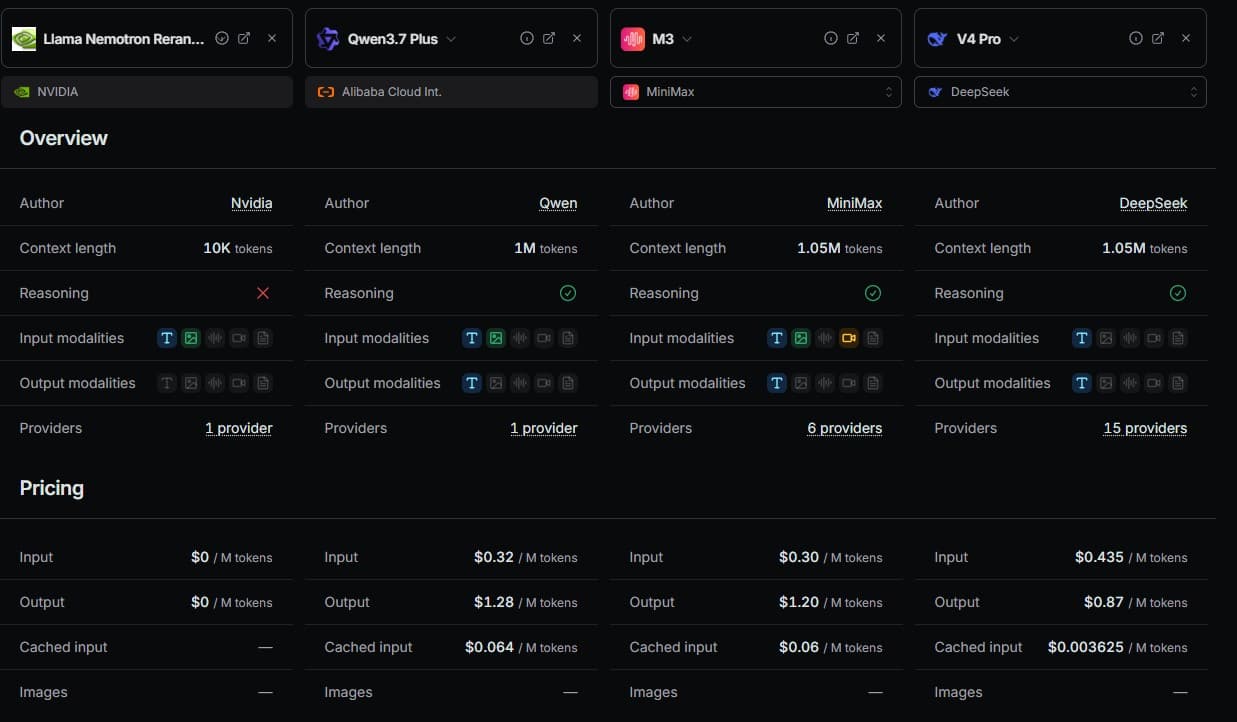
Two boring details matter a lot: context length and pricing. Context length is how much information the model can handle at once. It is usually measured in tokens, which are chunks of text. A longer context window means the model can read more of your notes, code, files, or chat history before answering.
Input cost is what you pay for the tokens you send into the model. Output cost is what you pay for the tokens the model writes back. Output is often more expensive. That matters if you ask for long reports, full code files, detailed research, or repeated rewrites.
So when you compare something like Claude Fable 5 against an OpenAI GPT 5.5 or Codex 5.5 style model, do not only ask which one feels smarter. Check the input price, output price, context length, provider availability, and the task you are using it for. A cheaper model can be the better daily driver if it is good enough and you are running a lot of prompts.
Context length
A 10K token model can handle a much smaller pile of information than a 1M token model. Bigger is not always needed, but it matters for long documents and codebases.
Input versus output cost
If you paste a lot of files, input cost matters. If you generate long answers, output cost matters. Compare both before calling a model cheap.
Provider count
More providers can mean better fallback options, but it can also mean prices, speeds, and limits vary by provider.
Use a small source stack instead of chasing every opinion
My preferred approach is simple: use a few reliable places to compare the release, then run my own tests. I like model directories such as OpenRouter because they show practical details like context length, pricing, modalities, providers, and whether the model supports reasoning. I also like leaderboards like Arena because they give a quick view of how models compare across task categories.
That does not mean those sites are perfect. It means they are better than trying to follow a thousand sites or taking every random feed opinion as truth. Use them for signal, then test the model on your own work.
Model directory
Use OpenRouter models to compare context length, pricing, modalities, providers, and access.
Leaderboard
Use Arena leaderboards to check broad performance by task type before you believe the hype.
Your own test set
Run the same saved prompts across the models you are comparing. That is where the real decision happens.
Simple workflow
How to test a new model without wasting your day
You do not need a lab setup to test a model release. You need a small repeatable set of prompts that match your actual work. If you write, test a draft, a rewrite, and a headline. If you research, test a comparison question and ask for sources. If you code, test a bug, a small feature, and an explanation. If you create visuals, test a real prompt you would actually use.
Save those prompts somewhere. When a new model comes out, run the same prompts again. This gives you a practical comparison instead of relying on the loudest post in your feed.
Keep a test set
Use one writing prompt, one explanation prompt, one research prompt, one planning prompt, and one task from your real work.
Compare the full experience
Look at answer quality, speed, follow-up handling, formatting, source usefulness, and how much editing you still had to do.
Do not overreact
If the new model is only a little better for one task, you may not need to change anything yet.
When a model release should matter to beginners
A release matters most when it changes your access or your results. If a free plan gets a stronger model, beginners should pay attention. If a paid plan gets a feature you actually need, that may be worth testing. If a tool you already use becomes faster or better at your main tasks, that can save real time.
It matters less when the release is only important for enterprise buyers, API pricing, or a niche benchmark you will never touch. Those updates can still be interesting, but they do not all require action from you.
Pay attention when
The model improves a tool you already use, unlocks a free feature, helps your main workflow, or makes a task possible that was previously frustrating.
Skim it when
The release is mostly for large companies, developer infrastructure, or a use case far away from your current work.
Action checklist
What to do after a major model release
The best response to a major release is not to panic-scroll reactions. Give yourself a short test window. Read the announcement, check who can access the model, then run it against a few real tasks you already understand.
If the new model clearly improves your work, keep it in your stack. If it only looks impressive in demos, save the link and move on. Staying current does not mean rebuilding your workflow every time a company posts a launch video.
Ten-minute test
Try one writing task, one explanation task, one research task, and one task from your actual work before deciding whether the release matters.
Decision rule
Adopt the model only if it saves time, improves quality, lowers cost, or unlocks a task you could not handle well before.
The announcement is not the whole story
Companies announce releases in the best possible light. That is normal. Their job is to explain why the model matters. Your job is to separate the useful update from the marketing layer. Look for examples, limits, pricing, availability, and what users are seeing after the first day of testing.
A model may launch to only some users. It may be available in one app but not another. It may have usage caps. It may work great for demos but still struggle with long, messy, real-world tasks. None of that makes the release fake. It just means you should read the details before changing your workflow.
Details to check
Who gets access, what plan it is on, whether it is in the app or API, usage limits, file support, context length, and any stated safety or reliability limits.
Good habit
Wait for a few real user examples before deciding a release is a must-use upgrade.
How model releases affect your tool stack
Model releases are one reason your AI stack should stay flexible. Maybe ChatGPT gets better at coding. Maybe Claude feels stronger for writing and long documents. Maybe Gemini improves images or video. Maybe Grok adds a feature that comes bundled with something you already pay for. These changes do not mean you need every subscription. They mean the best tool for you can shift over time.
The move is not to chase every release. The move is to understand enough to make calm decisions. If a new model helps your real work, test it. If it does not, keep your stack simple and move on.
Stack rule
Use the fewest tools that cover your real tasks, then revisit when a model release changes one of those tasks in a clear way.
Review rhythm
Once a month, ask whether your current tools still match your writing, research, building, learning, or content workflow.
A simple filter for every model launch
The internet will keep turning model releases into sports. That can be fun to watch, but it is not a learning system. Beginners need a filter that turns each launch into a few plain questions.
Ask what changed, who gets access, what it costs, what tasks it improves, whether people are seeing real results, and whether it affects anything you do this week. If the answer is no, you can stay informed without stopping your whole day.
Question 1
What does this model do better than the previous one?
Question 2
Is it available to me, or is this mostly for developers and companies right now?
Question 3
Does it improve a task I actually do, or is it just interesting news?
Question 4
Can I test it on a free plan, trial, or existing subscription before paying more?
FAQ
Is a new AI model always better than the old one?
No. A new model may be better at some tasks and weaker or different at others. Test it on your own work before assuming it is better for everything.
Do beginners need to follow every AI model release?
No. Beginners should follow the major releases that affect tools they use, free access, pricing, or practical tasks like writing, research, coding, images, or planning.
What should I look for in a model release announcement?
Look for what changed, who gets access, what plan it is on, what tasks improved, what limits exist, and whether real users are seeing better results.
How do I know if a new model is worth trying?
Try it when it improves a tool you already use, offers a feature you need, or claims to be better at a task you do often. Run a few saved prompts and compare the output.
Where to go next
Keep the momentum going with the daily brief, the full blog archive, the glossary, and the story behind ACC Network.