Back to daily archive

D A I L Y   N E W S

2026-10-20

Less phone tag. Fewer final-final files.

Tuesday, October 20, 2026

Getting dinner should not require three tabs and a phone call you keep putting off. Fixing a Google account should not require guessing the exact words in a help article, either. Today's useful changes live in those small annoyances. Yelp can call a restaurant to ask about the wait, while Google is testing support pages that begin with an AI answer instead of the full article. ChatGPT Slides is also adding shared editing, so a teammate can help fix the deck without another round of exported files. None of this needs a benchmark chart to make sense. The question is whether it removes a real step without hiding something important. Google's original instructions still matter. A restaurant's wait estimate is not a booking. A prettier presentation still needs its facts checked. Pick the smallest useful task, keep the result easy to inspect, and judge the tool by the work it saves you.

Today's top stories

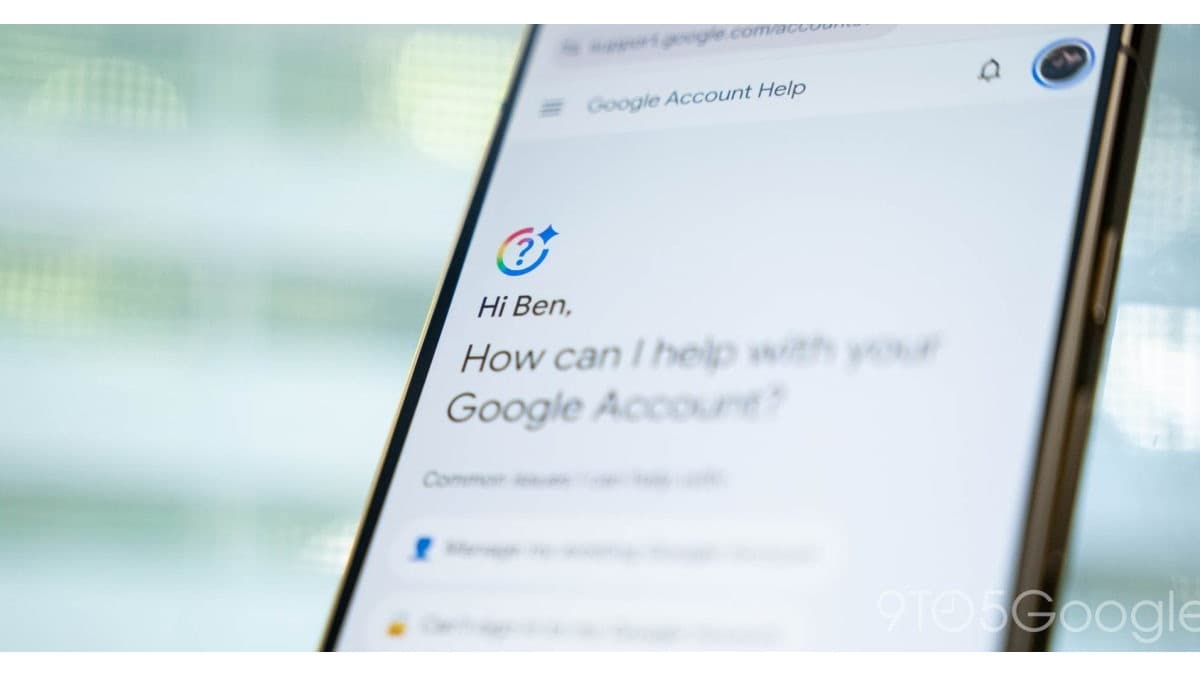
Angled smartphone displaying Google Account Help and a personalized help prompt
9to5Google.
9to5Google

The help article is still there. Now you may have to ask for it.

You open a Google help link because something is broken. Instead of a long article, you may now land on an AI summary and a box for follow-up questions. 9to5Google reports that this test is appearing in Google Account Help and Chrome support, while other areas, including Pixel Help, still show traditional articles. This is a change in how some help pages open, not evidence that every Google guide has disappeared. The useful part is being able to describe your problem in ordinary words. You do not have to know the exact name of a setting before asking what to try next. Ask Google Help condenses the article into troubleshooting steps, then lets you ask Gemini follow-up questions. That could make the first step easier when a menu name means nothing to you. The important escape hatch is View Sources at the bottom of the answer. It still leads to the original article. Open it when the fix depends on your device, account type or a restriction the short answer may have skipped. Google warns that AI answers can be inaccurate. For account recovery or security settings, do not treat a confident summary as a reason to skip the official instructions, and never paste passwords or verification codes into an experiment.

Why it matters Try it on a low-stakes question first, such as finding a setting. Compare the short answer with the underlying guide. A helpful summary should shorten the search, not make the evidence harder to reach.
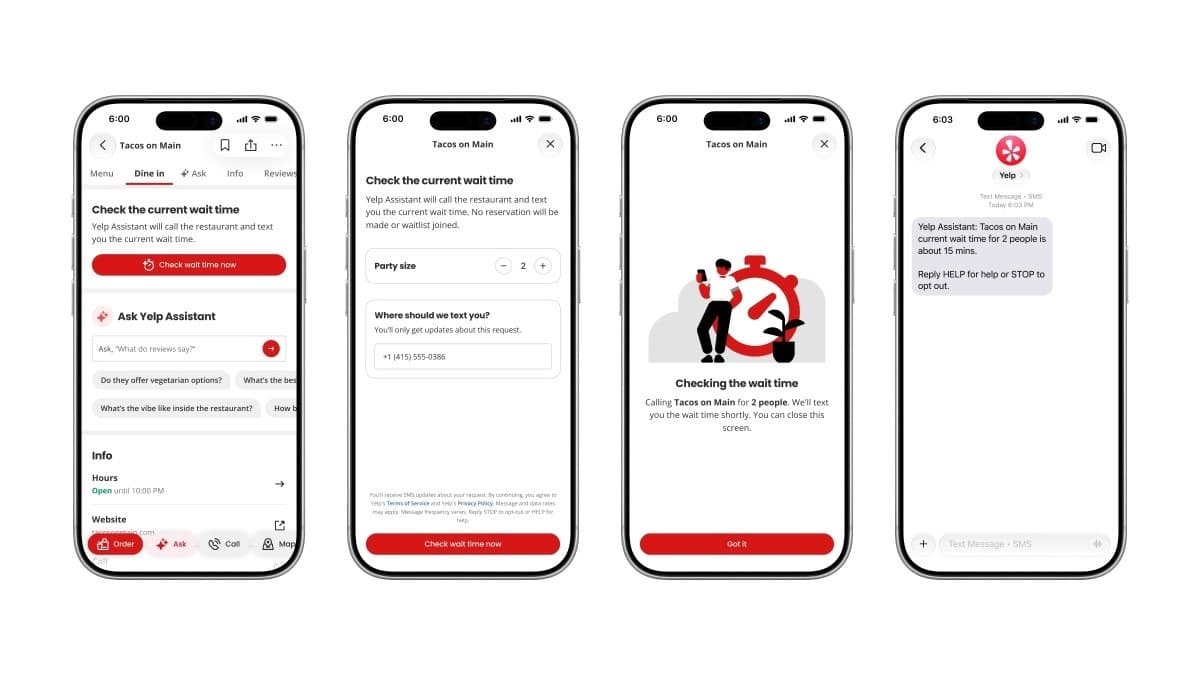

Yelp restaurant wait-time checking feature shown on phones
Yelp via TechCrunch.
TechCrunch / Yelp

Let Yelp make the awkward little restaurant call.

You have picked a restaurant. Now someone has to call and ask how long the wait is. Yelp's new Check for Me feature takes on that small job. TechCrunch reports that you enter your party size and phone number on a restaurant page, the assistant calls the business, and it texts the answer back. You still decide whether to go. That is a more useful starting point than handing an assistant your whole evening. The task has a clear beginning and end. Ask about the wait for this group, then return the answer. The product images make another boundary explicit. It does not make a reservation or put your name on a waitlist. A text saying about fifteen minutes is information, not a guaranteed table waiting for you. Yelp is also adding an OpenTable integration for bookings inside the app. Keep that separate from the wait-time call. Before relying on either, read the confirmation and check that you have actually booked what you intended. Restaurant conditions can change between a phone call and your arrival.

Why it matters If Check for Me appears in your app, try it for a flexible meal rather than a time-critical group booking. Review which phone number you provide and check the text before leaving. The report does not establish that every restaurant or account has the feature. A narrow assistant that returns one useful answer is enough. It does not need to run dinner.

Editorial composite of a man beside a smartphone displaying an older ChatGPT interface
Digit.
Digit / OpenAI

Your presentation does not need another final-final file.

The first draft of a presentation is rarely the last problem. A teammate needs to fix a number, someone wants a clearer chart, and comments arrive in three different places. Digit reports that ChatGPT Slides now supports real-time shared editing and comments, alongside direct changes to text, charts, images and shapes. OpenAI announced these additions on October 19. This is a collaboration update, not a second announcement that Slides exists. The practical difference is staying in one deck while people review it. You can ask ChatGPT to create slides from a conversation or a file, then have collaborators edit and leave feedback. ChatGPT or its dot agent can help turn that feedback into changes. The report says you can present inside ChatGPT or export to PowerPoint or Google Slides. Access is the catch. These features are listed for Pro, Business and Enterprise plans. Do not assume a free or Plus account includes them, and do not buy a subscription just because a feature sounds useful. Start by checking what your current account actually offers and whether the people reviewing the deck can participate.

Why it matters For a small team, test a five-slide presentation with non-sensitive material. Have one person verify the facts while another edits the explanation. Then inspect the exported version before a real meeting. Shared editing can reduce version confusion. It does not verify a chart, approve a claim or give you permission to share a client file.

More AI signals

  • Social Media Today
    Labels are a plan, not a finished fix

    Social Media Today reports that Instagram wants more AI labels and better ways to address copied creator work. Mosseri says it is still working out the approach, so do not mistake that for a new protection already in place.

  • The Verge
    Check the speaker, not just the Wi-Fi bill

    The Verge reports unusually heavy downloads on some Google Home Speakers, with Google saying a fix is rolling out. If your internet plan has a cap, check per-device usage rather than assuming every speaker is affected.

  • Anthropic
    For the people maintaining the tools you use

    Anthropic’s existing OSS Scanner offers eligible open-source projects free periodic security scans. Its fast-track reports are automated and can contain false positives, so maintainers still need to investigate.

LLM releases and new features

  • Digit / OpenAI
    Useful controls beat another scorecard.

    ChatGPT Slides now adds shared editing, comments and direct changes to slide elements on Pro, Business and Enterprise. Separately, OpenAI is highlighting model work on older software languages such as COBOL and Fortran. That is developer work behind everyday systems, not a new consumer feature or a reason to expect a bank migration to run itself.

Courses and learning

  • Claude Academy
    Turn an assistant into a team habit.

    Claude Academy’s free Building effective human-agent teams course is aimed at team leads already using AI, with no technical background required. The page lists five lessons, one quiz and 45 minutes. Start with The shift to multiplayer, then write down one role, one approval boundary and the information your assistant actually needs. Sign in if you want to save progress.

Events

  • OpenAI Academy
    A practical introduction, open to everyone.

    OpenAI Academy’s online ChatGPT 101 for Government Professionals runs October 23 from 11.30 AM to 12.30 PM Eastern. Olivia Volkin covers prompting, everyday workflows and human judgment. It is designed for government work but open to everyone. Registration is offered, with no ticket price displayed. Keep confidential work information out of examples.

Your Move

  • ACC Network
    Give one small chore a clean finish.

    Choose one task you already understand. Find the original Google help instructions, check a restaurant wait, or revise five slides with a teammate. Define what done looks like before you start. Compare the result with the old way, and stop if checking the answer costs more time than the tool saves.