

Compare ChatGPT, Claude, and Gemini for writing, research, coding, files, voice, images, integrations, pricing, and everyday beginner use.
Choosing an AI assistant should be simple. Instead, beginners get dropped into a nonstop argument about which model is smartest, which benchmark matters, and which subscription they need before they have finished ten useful prompts. If you read the older ACC guide on AI model releases, remember the main lesson: a new model only matters when it changes what you can actually do, how much it costs, or how well it fits your work.
I made that mistake. I added ChatGPT because everybody had it, Gemini Pro because I heard it was good for photos and video, and Claude because I heard it was best for coding. I was choosing from other people's hype instead of my own work.
My stack is more intentional now. ChatGPT is still my main paid daily tool for planning, content, instructions, regular chat, and a lot of building. I use Claude when I want another opinion on technical work or a coding model comparison. Gemini makes more sense when I want Google's ecosystem or creative features in the same place.
Once I understand what each model is good at, I actually like having more than one option. On a big project, I might plan the approach with Claude, then use ChatGPT to turn that plan into working steps. Other times I start in ChatGPT, then ask Claude to challenge the assumptions or give me a second opinion before I commit to the direction.
That is my workflow, not a permanent ranking. These products change constantly, and your best choice depends on the job. The goal of this guide is to help you pick one place to start, not talk you into three subscriptions.
Quick answer
Should a beginner pick ChatGPT, Claude, or Gemini?
Start with ChatGPT if you want one broad all-purpose assistant, Claude if writing, long documents, or focused technical work matters most, and Gemini if you already live in Gmail, Drive, Docs, Search, and Google's creative tools. The honest answer is that all three are capable enough for beginner work. Use the free plans, run the same five real tasks in each, and pay only after one tool proves it saves you time.
This comparison was reviewed on July 14, 2026. Plans, limits, model names, and included features change fast. Check each official pricing page before paying. If you need a wider tool overview, read the Best AI Tools for Beginners guide. If the instructions themselves are the hard part, start with What Is a Prompt?.
Quick Start
What to do first
Pick your main job. Writing, research, coding, Google Workspace, images, planning, or everyday questions should drive the choice.
Start free. All three offer a free starting point. Use it until a real limit interrupts useful work.
Run the same five tests. A fair side-by-side test beats a viral benchmark that has nothing to do with your day.
Pay for one winner. Do not stack subscriptions because each product won one category on somebody else's chart.
The quick comparison
There is no single best AI assistant for every beginner. Each product can write, summarize, explain, brainstorm, analyze files, and answer questions. The meaningful differences show up in the surrounding product, the integrations, the limits, and how the tool handles your repeated work.
Also, if you are on Windows, do not overthink the first test. Microsoft Copilot is already built into a lot of Windows and Microsoft work environments, has a free starting point, and can handle plenty of everyday tasks. If your job already gives you Copilot access, try that before adding another subscription.
Use this table as a starting filter, not a final verdict.
| Tool | Best starting fit | Main advantage | Watch for |
|---|---|---|---|
| ChatGPT | Beginners who want one broad assistant | A wide mix of chat, web, files, voice, images, projects, and building tools in one product | The number of models and features can feel confusing, and usage limits vary by plan |
| Claude | Writers, document-heavy users, and focused technical work | Clear writing, strong document workflows, projects, research, and coding tools | Free usage can run out during long or demanding sessions |
| Gemini | People already deep in Google's products | Tight connections across Google apps plus research, voice, image, and video features | The product is strongest when you actually use the Google ecosystem |
Plans checked July 14, 2026
Compare the prices fairly
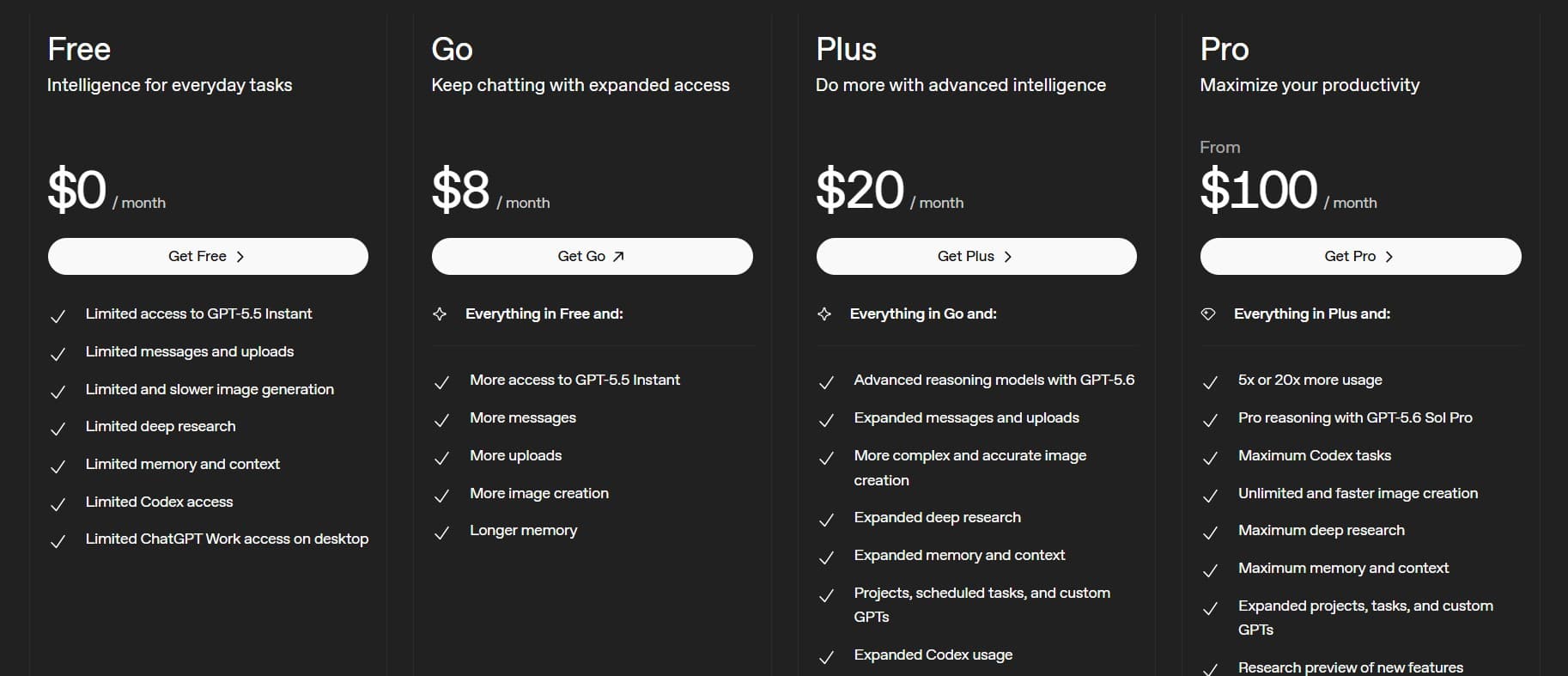
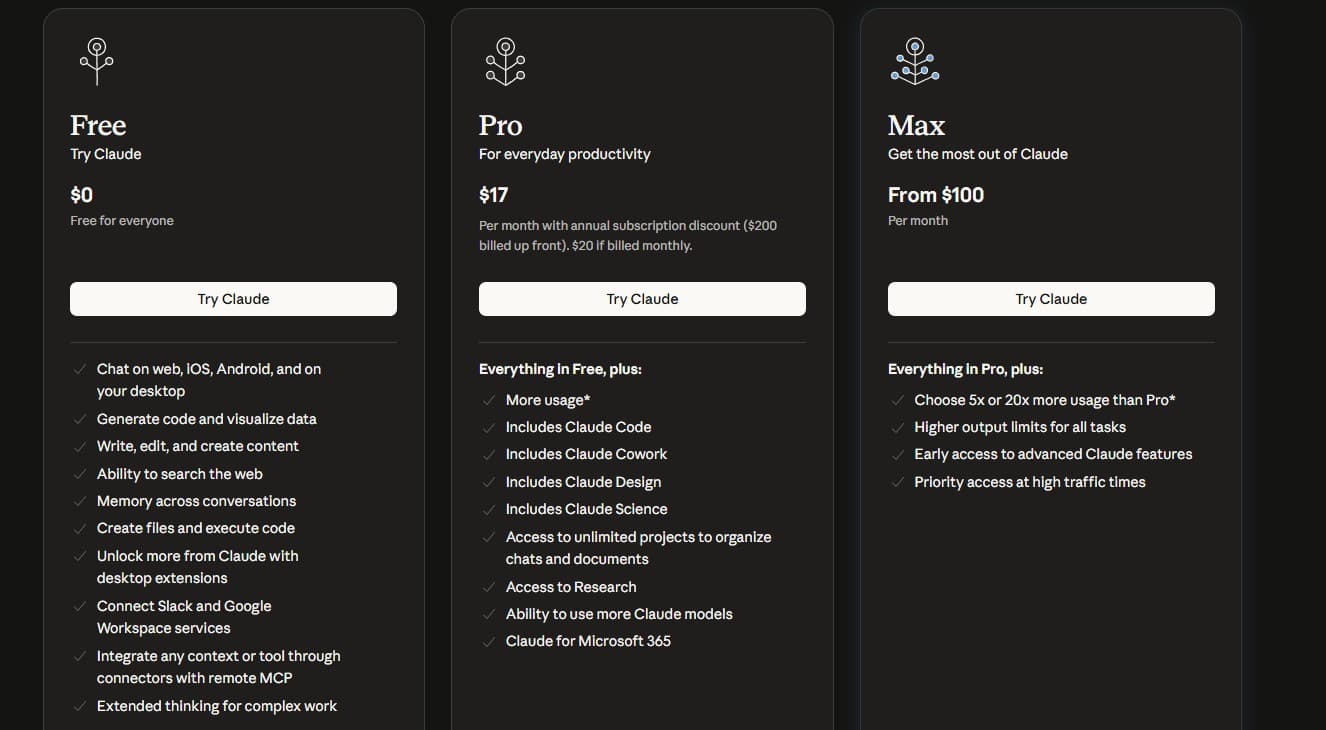
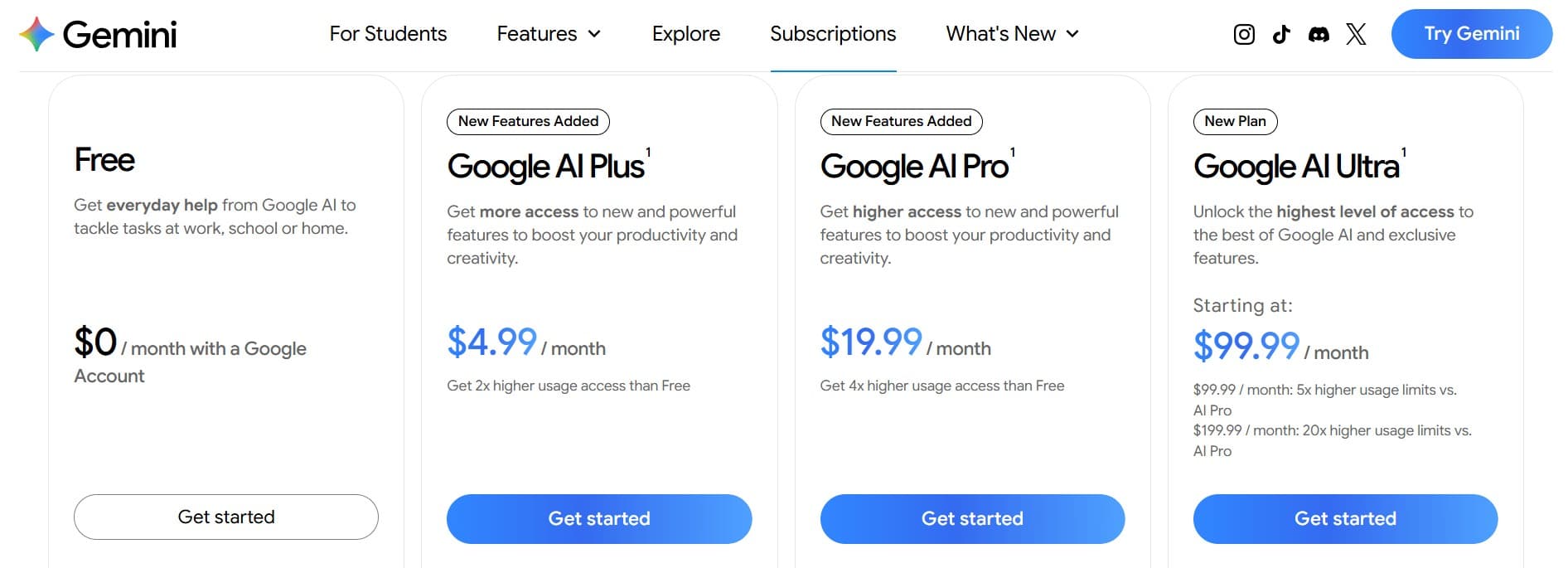
The first paid plan is not an apples-to-apples comparison. Claude starts its individual paid tier around $20 a month. Gemini offers a cheaper $4.99 step before its $19.99 Pro plan. ChatGPT offers a lower-cost Go plan before Plus, but the official U.S. Go price did not render consistently during research.
Run two separate comparisons. Start with Free against Free against Free. If you need more capacity, compare ChatGPT Plus, Claude Pro, and Google AI Pro as the roughly $20 track. Do not put a $4.99 plan beside two $20 plans and call it a clean comparison.
Prices are before tax and can vary by country, billing method, promotion, and app store. Open the official plan pages before paying.
| Tool | Free start | First paid step | Roughly $20 comparison tier |
|---|---|---|---|
| ChatGPT | Free plan | Go, a lower-cost plan. Verify the live U.S. price | Plus, $20 per month |
| Claude | Free plan | Pro, $20 monthly or $17 per month effective with $200 paid annually | Pro, the same plan |
| Gemini | Free plan | Google AI Plus, $4.99 per month | Google AI Pro, $19.99 per month |
Pick ChatGPT for the broadest starting point
ChatGPT is the easiest default when you do not know your main use yet. You can use it for explanations, planning, writing, file analysis, web questions, voice conversations, images, and increasingly serious building work without leaving one account.
That range is why it remains my main paid tool. I can move from a rough idea to an outline, draft, image, plan, or coding task in the same place. For a beginner exploring what AI can do, that flexibility has real value.
The downside is that a wide product can become a busy product. Different models, modes, usage limits, and new features can make you feel like you need to understand the whole dashboard. You do not. Start in the normal chat, use it for real work, and ignore advanced options until you need them.
Choose ChatGPT if
You want one general assistant, you are still discovering your use cases, or you value having text, voice, files, images, web access, and building tools under one roof.
Do not choose it just because
It is the name everybody knows. Familiarity is useful, but the tool still has to fit your work.
Check the current plan
Pick Claude for writing, documents, and focused technical work
Claude is a strong starting choice when most of your work is words, long documents, careful explanations, research, or coding. Its interface tends to keep the focus on the conversation and the material you are working through.
I use Claude when I want to compare technical output or try a different coding approach. It has also taught me the cost of real usage limits. I once hit the weekly cap in the middle of a build and had to wait or upgrade. That does not make Claude bad. It means the best tool can still be the wrong plan for your workload.
Anthropic's current free plan includes web chat, apps, web search, memory, file creation, and code execution. Paid plans increase usage and add more of Claude's project, research, coding, and productivity tools. Exact access changes, so check the plan page before building a workflow around one feature.
Choose Claude if
You spend a lot of time drafting, editing, reviewing long material, organizing projects, or doing technical work that benefits from a second careful pass.
Watch your usage if
You run long sessions, attach large files, or depend on the tool for hours of coding. Test the free plan, but notice how quickly your real workflow reaches the limit.
Check the current plan
Pick Gemini when Google is already your workspace
Gemini makes the strongest case when your day already happens in Gmail, Drive, Docs, Search, Chrome, and Google's other products. The assistant is not just a chat window. Its value is how it connects with the tools and information you already use.
Google's current free tier includes everyday Gemini access, image generation and editing, Deep Research, Gemini Live, Canvas, Gems, NotebookLM access, and cloud storage. Paid Google AI plans raise usage and add more features across Gemini and other Google products. Availability and limits vary by plan and location.
I originally paid attention to Gemini because I kept hearing about its photo and video strengths. That was not a good enough reason by itself. Gemini becomes a smarter choice when those creative tools or Google connections solve a task you already have.
Choose Gemini if
You want AI close to Google Search and Workspace, use NotebookLM, care about Google's voice and creative tools, or prefer one subscription tied to the Google products you already pay for.
Do not choose it just because
One demo looked impressive. Creative features are useful only if creating images, video, audio, or presentations is part of your real workflow.
Check the current plan
Use the job to make the decision
Brand loyalty is a bad beginner strategy. Match the assistant to the task you repeat. If two tools handle that task well, choose the one that fits the software, budget, and habits you already have.
These are practical starting recommendations, not permanent winners. A quarterly update can change the details. Your repeated task remains the better compass.
The reason I still use more than one model is not because I want a bigger software bill. It is because different tools give me different kinds of pushback. For larger work, that second pass can catch a weak plan, expose a missing step, or give me a cleaner way to explain the same idea.
| If your main need is | Start with | Why |
|---|---|---|
| One assistant for many different tasks | ChatGPT | Its broad product range gives a beginner room to explore |
| Writing and editing | Claude | It is a focused place for drafting, revising, and working through long text |
| Long documents and careful analysis | Claude or Gemini | Claude has strong project and document workflows, while Gemini adds Google and NotebookLM connections |
| Google Workspace and Search | Gemini | The surrounding Google ecosystem is the advantage |
| Images and creative experimentation | ChatGPT or Gemini | Both put visual generation and editing near the main assistant experience |
| Coding and building | ChatGPT or Claude | Both have serious coding products, but your language, repo, and workflow should decide |
| Voice-first use | ChatGPT or Gemini | Both make live voice a central beginner-facing experience |
| You are still unsure | All three free plans | Run a short test, then keep one |
Run the same five prompts before you pay
Do not compare one tool's best demo with another tool's worst screenshot. Give all three the same tasks, the same source material, and the same limits. Use work you understand well enough to judge.
Make the setup fair. Use a fresh chat, the default model for the plan, no saved memory, and the same prompt on the same day. If one tool needs a follow-up, give the same follow-up to all three.
Score each answer on correctness, instruction following, usefulness, clarity, traceability, and friction. The winner is the tool that reduces your work, not the one that writes the longest answer.
Test 1. Explanation
Explain a topic you already understand to a complete beginner in under 200 words. Define every technical term.
Test 2. Writing
Turn the same messy notes into a short email in your normal tone with one clear next action.
Test 3. Document
Upload the same safe, nonconfidential document and ask for a summary, three risks, and five questions that remain unanswered.
Test 4. Current research
Ask a question that needs fresh information. Require links, dates, and a clear separation between facts and recommendations.
Test 5. Your real weekly task
Use the task you will repeat most often. This score should count twice because it reflects the job you may pay for.
Score the result.
Give each tool one to five points for correctness, instruction following, usefulness, clarity, source quality, and friction. Record limits, failed uploads, retries, and cleanup time.
A free plan is enough until a limit becomes expensive
Most beginners should not pay on day one. Free access is enough to learn how prompting works, test writing and summaries, compare outputs, and find the tasks where AI actually helps.
Upgrade when you can name the limit. You need more usage for a repeated workflow. You need a specific model or feature. You need larger files, deeper research, better creative tools, stronger integrations, or fewer interruptions. A vague fear of missing out is not a reason to add another monthly bill.
My mistake was stacking tools before I had clear jobs for them. The better move is boring. Pick one. Use it for two weeks. Save the prompts that work. Add or switch only when your own results give you a reason.
Stay free if
You are still learning, use AI occasionally, or cannot name the paid feature that would change your work this month.
Upgrade if
A specific limit repeatedly interrupts valuable work and the paid plan costs less than the time or opportunity you are losing.
Cancel or switch if
The tool has not earned a repeated job in your week. Past hype is not a contract.
Privacy and accuracy still belong to you
All three assistants can make mistakes, misunderstand context, or produce a confident answer with a bad fact. Verify current claims, quotations, statistics, dates, and links before you use them.
Do not paste passwords, API keys, confidential client files, private company information, or sensitive health and financial records into a consumer AI chat. Review the current privacy controls, data-use settings, and workplace policy for the product and plan you choose.
Keep a human on high-stakes calls. The assistant can help with the work. It cannot carry the consequences for you.
The honest beginner recommendation
If you want a default answer, start with ChatGPT free because it gives you the widest room to explore. If you are on Windows or already work inside Microsoft tools, try Copilot too because it may already be close to your daily workflow. If your day is mostly writing, documents, and careful technical work, test Claude beside it. If your work already lives in Google or you want Google's research and creative ecosystem, test Gemini beside it.
Then stop comparing and use one. Good prompting and consistent practice matter more than switching assistants every time a new leaderboard appears.
The best AI assistant for a beginner is the one that helps finish a real task, fits the tools already in use, and earns its place before asking for a subscription.
FAQ
Is ChatGPT, Claude, or Gemini best for beginners?
ChatGPT is the broadest default, Claude is a strong fit for writing and document-heavy work, and Gemini is a strong fit for Google users. All three are capable enough to start, so test the free plans with the same real tasks.
Which is best for writing?
Claude is a strong first test for drafting and editing, but ChatGPT and Gemini can also write well. Compare them using your own source material and voice instead of a generic writing prompt.
Which is best for coding?
ChatGPT and Claude both offer serious coding workflows. The better choice depends on the codebase, language, tool access, session length, and how well the model handles your real tasks. Test the same small bug and feature in both.
Which is best for research?
All three offer web or research features. Gemini has a natural advantage for users invested in Google Search and NotebookLM, while ChatGPT and Claude also support current web research. Always open and verify the original sources.
Do I need to pay for more than one AI assistant?
No. Most beginners should use free plans and pay for one assistant only after a repeated workflow proves the upgrade is worth it.
Are ChatGPT, Claude, and Gemini free?
All three offer free consumer plans with usage and feature limits. Start there. If you compare paid plans, compare similar tiers instead of treating every provider's first paid plan as equal.
How often should I compare them again?
Review your choice every three months or when a real limitation appears. Do not switch because of every launch. Re-run the same saved test prompts and compare the results that matter to your work.
Where to go next
Keep the momentum going with the daily brief, the full blog archive, the glossary, and the story behind ACC Network.